김산나
[멋쟁이사자처럼부트캠프 유니티 게임 개발 7기] 2026년 1월 6일 회고록 - 연산자 본문
2026_01_06 강의 요약본
1. 문자열 입력 관련 메서드
<실습 코드>
using System;
using System.Collections.Generic;
using System.Linq;
using System.Text;
using System.Threading.Tasks;

namespace Lec20260106ConsoleRead
{
    internal class ConsoleReadTest
    {
        static void Main(string[] args)
        {
            // Lecture 1: 사용자 입력을 문자열로 받기

            Console.Write("이름을 입력하세요: ");
            string name = Console.ReadLine();           //사용자로부터 입력 받기

            Console.WriteLine($"안녕하세요, {name}님!"); // 입력값 출력
        }
    }
}
* 참고 - Read와 ReadLine의 차이
Read: 딱 글자 한 개를 읽고, 그 글자의 ASCII Code 를 알려준다.
ReadLine: 엔터 치기 전까지 전체를 읽고, 그 내용을 글자 그대로(문자열) 알려준다.
Write와 WriteLine이 줄바꿈을 하냐 마냐 차이인 것에 비해 제법 차이가 크다.
보통 Read는 [Y/N] 같은 질문에 사용하고, ReadLine은 이름, 주소 등 문자열 입력을 받는다.
<출력 결과>

2. 형식 변환
형식 변환 종류가 왤케 많은가... 반으로 줄여라 喝 !!!! ...인줄 알았으나
래핑이랑 형식 변환이랑은 근본적인 차이가 있다고 한다.
형식 변환 -> 해석 방식 변경 or 메모리 사이즈 조정 들어감 (진짜 변함)
래핑 -> 대상 데이터는 건들지 않고 그냥 복사해다가 특정 타입의 포장지에 넣어둠
용도를 비슷하게 사용 중이라 헷갈린다.
종류는 크게 네 개로 분류
- 암시적 형변환 (ex: int -> double)
- 명시적 형변환 (ex: int i = (int)3.14;)
- 래핑(박싱) (ex: object obj = 10; )
- 파싱(변환) (ex: int.Parse / Convert.To)
이 파트에서 설명하는 형식 변환은 4번 파싱에 해당한다.
<실습 코드>
using System;
using System.Collections.Generic;
using System.Linq;
using System.Text;
using System.Threading.Tasks;

namespace Lec20260105Parse
{
    internal class ParseTest
    {
        static void Main(string[] args)
        {
            // Lecture 2: 형식 변환하기

            Console.Write("나이를 입력하세요: ");
            string input = Console.ReadLine();
            int age = int.Parse(input);

            Console.WriteLine($"내년에는 {age+1}살이 되겠군요!");
        }
    }
}
코드 해설
- int.Parse(): int형식으로 변환
<출력 결과>

* 참고 - 암시적 변환, 명시적 변환
암시적 변환: 작은 범위의 값을 더 큰 범위의 자료형으로 변환
명시적 변환: 큰 범위의 값을 작은 범위의 자료형으로 변환
<실습 코드>
using System;
using System.Collections.Generic;
using System.Linq;
using System.Text;
using System.Threading.Tasks;

namespace Lec20260106Operator
{
    internal class POperatorTest
    {
        static void Main(string[] args)
        {
            // 형식 변환 추가 설명

            // * 암시적 변환 (작은 타입 -> 큰 타입)
            int smallNumber = 100;
            long bigNumber = smallNumber; //int -> long(자동 변환)
            double doubleNumber = smallNumber; //int -> double(자동 변환)

            Console.WriteLine("=== 암시적 변환 ===");
            Console.WriteLine($"int: {smallNumber}, {smallNumber.GetType()}");
            Console.WriteLine($"long: {bigNumber}, {bigNumber.GetType()}");
            Console.WriteLine($"double: {doubleNumber}, {doubleNumber.GetType()}");

            // * 명시적 변환 (큰 타입 -> 작은 타입)
            double pi = 3.14159;
            int intpi = (int)pi; // 소수점을 버림(명시적 변환 필요)

            Console.WriteLine("\n=== 명시적 변환 ===");
            Console.WriteLine($"double: {pi}, {pi.GetType()}");
            Console.WriteLine($"int: {intpi}, {intpi.GetType()}");

            // * 문자열을 숫자로 변환
            string scoreText = "95";
            int score = int.Parse(scoreText); // 문자열 -> 정수

            string priceText = "19.99";
            double price = double.Parse(priceText); // 문자열 -> 실수

            Console.WriteLine("\n=== 문자열 변환 ===");
            Console.WriteLine($"점수(문자열): {scoreText}({scoreText.GetType()}) -> 숫자: {score}({score.GetType()})");
            Console.WriteLine($"가격(문자열): {priceText}({priceText.GetType()}) -> 숫자: {price}({price.GetType()})");

            // * 숫자를 문자열로 변환
            int playerLevel = 50;
            string levelText = playerLevel.ToString(); // 정수 -> 문자열

            Console.WriteLine("=== 숫자를 문자열로 ===");
            Console.WriteLine($"레벨(숫자): {playerLevel}({playerLevel.GetType()}) -> 문자열: {levelText}({levelText.GetType()})");
        }
    }
}
<출력 결과>
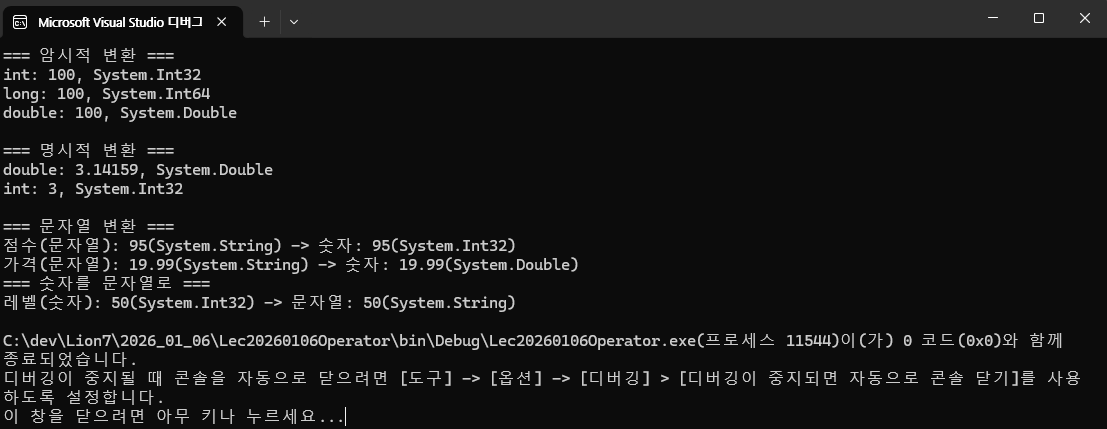
double(실수) -> int(정수) 변환 시 소수점이 사라지는 것을 확인할 수 있다.
* 참고 - (자료형)과 Convrt.To의 차이 (feat. Parse)
- (int): 데이터가 좀 잘려 나가도 좋으니 그냥 강제로 형식을 맞추쇼 (보통 숫자 타입끼리)
- Convert.ToInt32(): 이 문자열이나 다른 객체를 정수로 바꾸고 만약 소수점이 있다면 반올림을 하쇼 (좀 더 깔쌈함)
- Parse: 문자열 전문 (엄격해서 값이 비어있거나 하면 자멸함)
+ 추가
// 1. 명시적 변환 시 데이터 손실
double value = 9.8;
int result = (int)value;  // 9.8 → 9 (소수점 버려짐!)

// 2. 범위 초과
int bigValue = 300;
byte smallValue = (byte)bigValue;  // 오버플로우 발생!

// 3. 잘못된 문자열 변환
string text = "abc";
// int num = int.Parse(text);  // ❌ 런타임 오류!

// 안전한 변환: TryParse 사용
if (int.TryParse(text, out int num))
{
    Console.WriteLine($"변환 성공: {num}");
}
else
{
    Console.WriteLine("변환 실패!");
}
자료형 변환 시 주의사항
- 명시적 변환 시 데이터 손실
- 범위 초과
- 잘못된 문자열 변환
3. 이진수 다루기
<실습 코드>
using System;
using System.Collections.Generic;
using System.Linq;
using System.Text;
using System.Threading.Tasks;

namespace Lec20260106Binary
{
    internal class ConvertTest
    {
        static void Main(string[] args)
        {
            // Lecture 3: 2진수 - 10진수 변환

            Console.Write("2진수를 입력하세요: ");
            string binaryinput = Console.ReadLine();
            int decimalValue = Convert.ToInt32(binaryinput, 2);         // 2진수 정수를 10진수로 변환
            string binaryOutput = Convert.ToString(decimalValue, 2);    // 10진수 정수를 2진수로 변환

            Console.WriteLine($"입력한 이진수: {binaryinput}");
            Console.WriteLine($"10진수 변환: {decimalValue}");
            Console.WriteLine($"다시 2진수로 변환: {binaryOutput}");


            // Mission 3: 캐릭터 생성하기

            Console.WriteLine("=== 캐릭터 생성 ===");
            Console.Write("캐릭터 이름을 입력하세요: ");
            string UserName = Console.ReadLine();
            Console.WriteLine($"환영합니다, {UserName}님!");
            Console.Write("시작 레벨을 입력하세요: ");
            string UserLevel = Console.ReadLine();
            Console.WriteLine($"{UserName}님의 시작 레벨은 {UserLevel}입니다.");
        }
    }
}
코드 해설
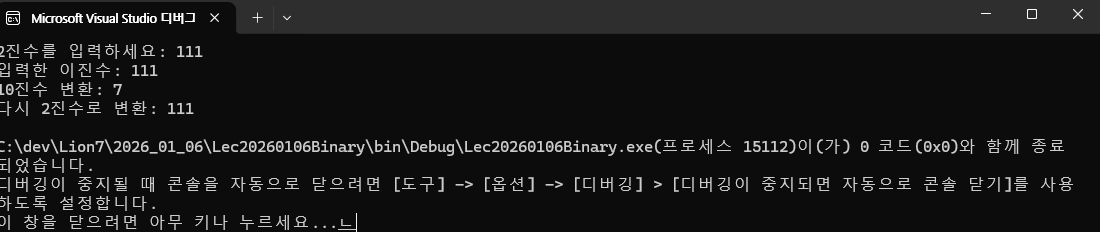
- Convert.ToInt32(변환 대상, 대상의 진수): Int32형식으로 변환
- Convert.ToString(변환 대상, 대상의 진수): String형식으로 변환
<출력 결과>
4. 키워드로 암시적으로 형식화된 로컬 변수 만들기 (var)
var은 자동으로 변수의 타입을 지정해 준다.
타입으로 추정이 불가능하기 때문에 코드 가독성이 떨어질 수 있음.
그러므로 보안이 중요한 경우나 너무너무너무귀찮은 경우 사용한다.
<실습 코드>
using System;
using System.Collections.Generic;
using System.Linq;
using System.Text;
using System.Threading.Tasks;

namespace Lec20260106Var
{
    internal class VarTest
    {
        static void Main(string[] args)
        {
            //Lecture 4: Var을 사용하여 변수 선언
            var name = "Alice";         // 문자열로 추론
            var age = 25;               // 정수로 추론
            var isStudent = true;       // 논리값으로 추론

            Console.WriteLine($"이름: {name}, 나이{age}, 학생 여부: {isStudent}");

        }
    }
}
<출력 결과>

5. 변수의 기본값을 default 키워드로 설정하기
각 자료형의 기본값을 넣는 키워드이다.
<실습 코드>
using System;
using System.Collections.Generic;
using System.Linq;
using System.Text;
using System.Threading.Tasks;

namespace Lec20260106Default
{
    internal class DefaultTest
    {
        static void Main(string[] args)
        {
            // Lecture 5: default 키워드를 사용한 기본값 설정

            int defaultInt = default;
            string defaultString = default;
            bool defaultBool = default;

            Console.WriteLine($"정수 기본값: {defaultInt}");
            Console.WriteLine($"문자열 기본값: {defaultString}");
            Console.WriteLine($"논리값 기본값: {defaultBool}");
        }
    }
}
초기화에 좀 쓸 수 있을듯?
<출력 결과>

6. 연산자
우리가 아는 그 산수가 맞다.
<실습 코드>
using System;
using System.Collections.Generic;
using System.Linq;
using System.Text;
using System.Threading.Tasks;

namespace Lec20260106Operator
{
    internal class POperatorTest
    {
        static void Main(string[] args)
        {
            // Lecture 6: 연산자

            int a = 5, b = 3;
            int sum = a + b;            // 산술 연산자
            bool isEqual = (a == b);    // 관계형 연산자

            Console.WriteLine($"합: {sum}");
            Console.WriteLine($"a와 b가 같은가? {isEqual}");

        }
    }
}
<출력 결과>

7. 단항 연산자
<실습 코드>
using System;
using System.Collections.Generic;
using System.Linq;
using System.Text;
using System.Threading.Tasks;

namespace Lec20260106UnaryOperator
{
    internal class UnaryOperatorTest
    {
        static void Main(string[] args)
        {
            // Lecture 7: 단항 연산자
            int num = 5;
            Console.WriteLine(+num);
            Console.WriteLine(-num);

            bool flag = true;
            Console.WriteLine(!flag);
        }
    }
}
<출력 결과>
8. 변환 연산자
2번 항목 참고. 내용 동일.
9. 산술 연산자
| 기호 | 내용 |
| + | 덧셈 |
| - | 뺄셈 |
| * | 곱셈 |
| / | 나눗셈 |
| % | 나머지 |
<실습 코드>
using System;
using System.Collections.Generic;
using System.Linq;
using System.Text;
using System.Threading.Tasks;

namespace Lec20260106ArithmeticOperator
{
    internal class ArithmeticOperatorTest
    {
        static void Main(string[] args)
        {
            //Lecture 9: 산술 연산자
            int a = 10, b = 3;

            Console.WriteLine(a+b);
            Console.WriteLine(a-b);
            Console.WriteLine(a*b);
            Console.WriteLine(a/b);
            Console.WriteLine(a%b);
        }
    }
}
10. 문자열 연산자
"+"를 사용해 문자열을 연결할 수 있다.
<실습 코드>
using System;
using System.Collections.Generic;
using System.Linq;
using System.Text;
using System.Threading.Tasks;

namespace Lec20260106StringOperator
{
    internal class Program
    {
        static void Main(string[] args)
        {
            // Lecture 10: 문자열 연산자

            string firstName = "Alice";
            string lastName = "Smith";

            Console.WriteLine(firstName+" "+lastName);
        }
    }
}
<출력 결과>

11. 할당 연산자
"="과 산술 연산자를 결합하여 단순 산술 연산을 조금 더 컴펙트하게 표현할 수 있다.
<실습 코드>
using System;
using System.Collections.Generic;
using System.Linq;
using System.Text;
using System.Threading.Tasks;

namespace Lec20260106AllocationOperator
{
    internal class AllocationOperatorTest
    {
        static void Main(string[] args)
        {
            //ㅣLecture 11: 할당 연산자

            int a = 5;
            a = a +5;
            Console.WriteLine(a);   // 출력: 10


            int b = 5;
            b += 5;
            Console.WriteLine(b);   // 출력: 10

            Console.WriteLine("=== 기본 산술 연산자 ===");

            //a, b 초기화
            a = 5;
            b = 5;

            a = a + b;
            Console.WriteLine("합계: " + a);

            a = 5;
            a = a - b;
            Console.WriteLine("합계: " + a);

            a = 5;
            a = a * b;
            Console.WriteLine("합계: " + a);

            a = 5;
            a = a / b;
            Console.WriteLine("합계: " + a);

            a = 5;
            a = a % b;
            Console.WriteLine("합계: " + a);


            Console.WriteLine("\n=== 할당 연산자 ===");


            a = 5;
            a += b;
            Console.WriteLine("합계: " + a);

            a = 5;
            a -= b;
            Console.WriteLine("합계: " + a);

            a = 5;
            a *= b;
            Console.WriteLine("합계: " + a);

            a = 5;
            a /= b;
            Console.WriteLine("합계: " + a);

            a = 5;
            a %= b;
            Console.WriteLine("합계: " + a);

            // Mission 11_1: 캐릭터 스텟 계산

            int baseAttack = 50;
            int weaponDamage = 30;
            int totalAttack = baseAttack + weaponDamage;

            Console.WriteLine("\n=== 공격력 계산 ===");
            Console.WriteLine($"기본 공격력: {baseAttack}");
            Console.WriteLine($"무기 데미지: {weaponDamage}");
            Console.WriteLine($"총 공격력: {totalAttack}");

            // Mission 11_2: 데미지 계산

            int playerHP = 100;
            int damage = 25;
            playerHP -= damage;

            Console.WriteLine("\n=== 데미지 계산 ===");
            Console.WriteLine($"받은 데미지: {damage}");
            Console.WriteLine($"남은 체력: {playerHP}");

            // Mission 11_3: 경험치 계산

            int Killedmonsters = 5;
            int expPerMonster = 100;
            int totalExp = Killedmonsters * expPerMonster;

            Console.WriteLine("\n=== 경험치 획득 ===");
            Console.WriteLine($"처치한 몬스터: {Killedmonsters}마리");
            Console.WriteLine($"몬스터당 경험치: {expPerMonster}");
            Console.WriteLine($"총 경험치: {totalExp}");

            // Mission 11_4: 골드 분배

            int totalGold = 1000;
            int playerCount = 4;
            int goldPerPlayer = totalGold / playerCount;
            int remainingGold = totalGold % playerCount;

            Console.WriteLine("\n=== 골드 분배 ===");
            Console.WriteLine($"총 골드: {totalGold}G");
            Console.WriteLine($"플레이어 수: {playerCount}명");
            Console.WriteLine($"1인당 골드: {goldPerPlayer}G");
            Console.WriteLine($"남은 골드: {remainingGold}G");
        }
    }
}
<출력 결과>

12. 증감 연산자
<실습 코드>
using System;
using System.Collections.Generic;
using System.Linq;
using System.Text;
using System.Threading.Tasks;

namespace Lec20260106IncrementDecrementOperators
{
    internal class IncrementDecrementOperatorsTest
    {
        static void Main(string[] args)
        {
            //Lecture 12: 증감 연산자 ++ --

            int a = 3;
            a++; // 1 증가
            Console.WriteLine(a);

            a--; // 1 감소
            Console.WriteLine(a);

            // * 주의 사항 - 전위, 후위 연산
            int count = 5;

            // 전위 연산
            Console.WriteLine(++count);

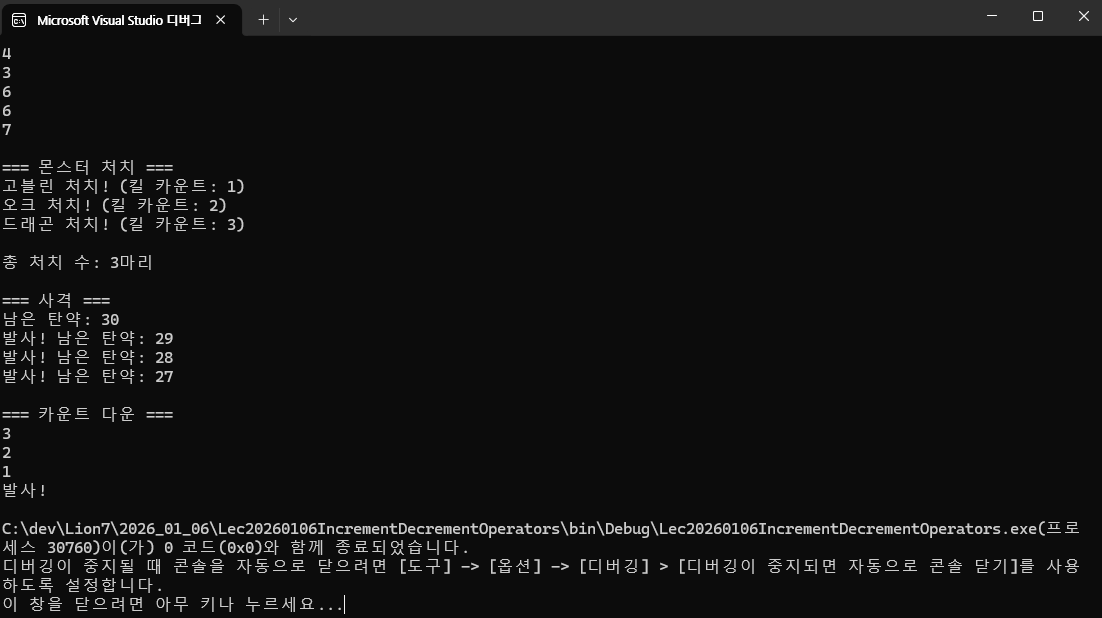
            // 후위 연산 - 해당 라인의 컴파일이 끝난 후 연산
            Console.WriteLine(count++);
            Console.WriteLine(count);

            // Mission 12: 전위, 후위를 사용한 콘솔 출력

            int KillCount = 0;

            Console.WriteLine("\n=== 몬스터 처치 ===");
            Console.WriteLine($"고블린 처치! (킬 카운트: {++KillCount})");
            Console.WriteLine($"오크 처치! (킬 카운트: {++KillCount})");
            Console.WriteLine($"드래곤 처치! (킬 카운트: {++KillCount})");
            Console.WriteLine($"\n총 처치 수: {KillCount}마리");

            int bullets = 30;
            Console.WriteLine("\n=== 사격 ===");
            Console.WriteLine($"남은 탄약: {bullets}");
            Console.WriteLine($"발사! 남은 탄약: {--bullets}");
            Console.WriteLine($"발사! 남은 탄약: {--bullets}");
            Console.WriteLine($"발사! 남은 탄약: {--bullets}");

            int countdown = 3;
            Console.WriteLine("\n=== 카운트 다운 ===");
            Console.WriteLine(countdown--);
            Console.WriteLine(countdown--);
            Console.WriteLine(countdown--);
            Console.WriteLine("발사!");


        }
    }
}
<출력 결과>
13. 관계형 연산자
<실습 코드>
using System;
using System.Collections.Generic;
using System.Linq;
using System.Text;
using System.Threading.Tasks;

namespace Lec20260106RelationalOperators
{
    internal class RelationalOperatorsTest
    {
        static void Main(string[] args)
        {
            // Lecture 13: 관계형 연산자

            int x = 5;
            int y = 10;

            Console.WriteLine($"x < y는 {x < y}이다.");
            Console.WriteLine($"x > y는 {x > y}이다.");
            Console.WriteLine($"x = y는 {x == y}이다.");
            Console.WriteLine($"x != y는 {x != y}이다.");


        }
    }
}
<출력 결과>
14. 논리 연산자
AND, OR, NOT이다.
AND는 곱셈을 생각하면 쉽다. 값 중 0이 하나라도 있으면 그 연산은 무조건 0이 나온다.
OR은 덧셈을 생각하면 쉽다. 값 중 1이 하나라도 있으면 그 연산은 무조건 1 혹은 1 이상이 나온다.
NOT 청개구리. 현재 진리값의 역을 하면 된다.
<실습 코드>
using System;
using System.Collections.Generic;
using System.Linq;
using System.Text;
using System.Threading.Tasks;

namespace Lec20260106LogicalOperators
{
    internal class LogicalOperatorsTest
    {
        static void Main(string[] args)
        {
            // Lecture 14: 논리 연산자

            //AND
            bool a = true;
            bool b = true;

            Console.WriteLine("=== AND 진리표 ===");
            Console.WriteLine("  A    B       S");
            a = false; b = false;
            Console.WriteLine($"{a} {b}  {a&&b}");
            a = false; b = true;
            Console.WriteLine($"{a} {b}   {a && b}");
            a = true; b = false;
            Console.WriteLine($"{a}  {b}  {a && b}");
            a = true; b = true;
            Console.WriteLine($"{a}  {b}   {a && b}");

            Console.WriteLine("\n=== OR 진리표 ===");
            Console.WriteLine("  A    B       S");
            a = false; b = false;
            Console.WriteLine($"{a} {b}  {a || b}");
            a = false; b = true;
            Console.WriteLine($"{a} {b}   {a || b}");
            a = true; b = false;
            Console.WriteLine($"{a}  {b}  {a || b}");
            a = true; b = true;
            Console.WriteLine($"{a}  {b}   {a || b}");

            Console.WriteLine("\n=== NOT 진리표 ===");
            Console.WriteLine("  X       !X");
            a = false;
            Console.WriteLine($"{a}    {!a}");
            a = true;
            Console.WriteLine($"{a}     {!a}");

        }
    }
}
<출력 결과>
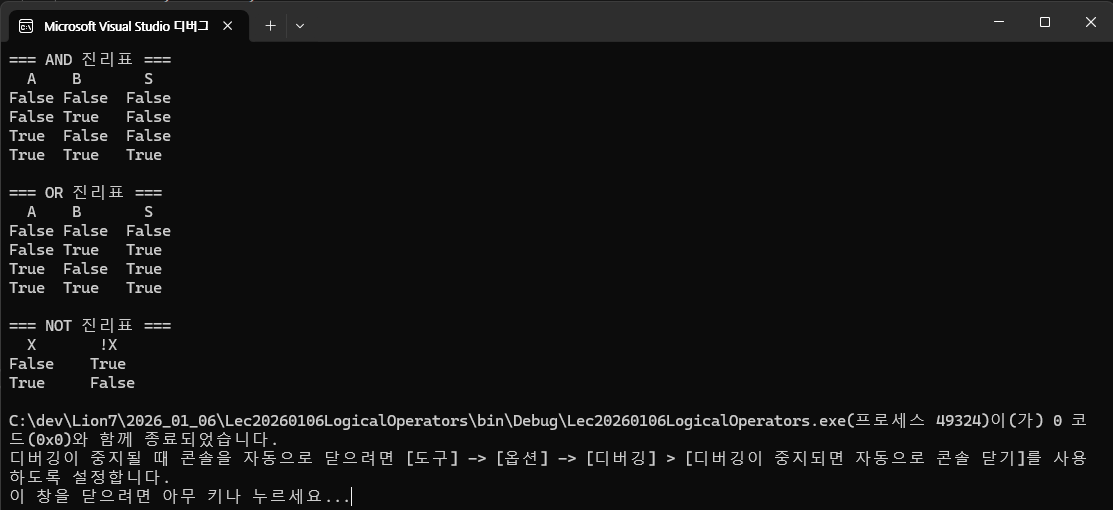
15. 비트 연산자
정수, 실수 산수가 아니라 2진수 연산을 말한다.
2진수에서는 AND, OR의 bool연산을 떠올리면 좋다.
XOR은 두 값이 다르면 1, 같으면 0을 뱉는 연산이다.
NOT은 동일하다.
| 기호 | 내용 |
| AND | 모든 값이 1인 경우만 1 |
| OR | 모든 값이 0인 경우만 0 |
| NOT | 값 반전 |
| XOR | 두 값이 다른 경우 or 값들 중 1이 홀수 개인 경우만 1 |
<실습 코드>
using System;
using System.Collections.Generic;
using System.Linq;
using System.Text;
using System.Threading.Tasks;

namespace Lec20260106BitOperators
{
    internal class BitOperatorsTest
    {
        static void Main(string[] args)
        {
            // Lecture 15: 비트 연산자
            int x = 5; //0000 0101
            int y = 3; //0000 0011

            string binary = Convert.ToString(x & y, 2);

            Console.WriteLine("=== 비트 연산자 ===");

            binary = Convert.ToString(x & y, 2);
            Console.WriteLine($"X AND Y = {binary.PadLeft(8, '0')}");

            binary = Convert.ToString(x | y, 2);
            Console.WriteLine($"X OR Y = {binary.PadLeft(8, '0')}");

            binary = Convert.ToString(x ^ y, 2);
            Console.WriteLine($"X XOR Y = {binary.PadLeft(8, '0')}");

            binary = Convert.ToString(~x, 2);
            Console.WriteLine($"NOT X = {binary.PadLeft(8, '0')}");


        }
    }
}
<출력 코드>
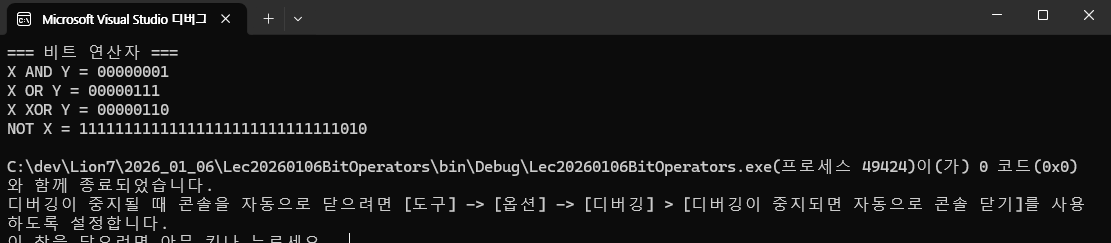
16. 시프트 연산자
시프트 연산자는 숫자값을 2진수로 취급하고, 그 숫자의 2진코드를 움직이는 기능을 한다.
- (데이터) << (움직일 칸 수)
- (데이터) >> (움직일 칸 수)
이렇게 사용한다.
그거 아시나요? "<< 1"을 하면 값의 두 배가 됩니다.
예시 - 1010 (10) << 1 = 10100(20)
<실습 코드>
using System;
using System.Collections.Generic;
using System.Linq;
using System.Text;
using System.Threading.Tasks;

namespace Lec20260106ShiftOperators
{
    internal class ShiftOperatorsTest
    {
        static void Main(string[] args)
        {
            // Lecture 16: 시프트 연산자

            int value = 4; // 0101

            string binary = Convert.ToString(value << 1, 2);
            Console.WriteLine(binary.PadLeft(8, '0')); // 1000

            binary = Convert.ToString(value >> 1, 2);
            Console.WriteLine(binary.PadLeft(8, '0')); // 0010

            // Mission 16: 시프트 연산자를 활용하여 인벤토리 구현

            int inventory = 0; // 0000 0000
            Console.WriteLine($"초기 인벤토리: {Convert.ToString(inventory, 2).PadLeft(8, '0')}");

            // 슬롯 번호
            int slot1 = 1; //활
            int slot2 = 2; // 지팡이

            // 슬롯 0에 활 추가
            inventory = inventory | (1 << slot1); // inventory의 'slot1'칸에 1을 덮어써라
            Console.WriteLine($"슬롯 {slot1}에 활 추가");
            Console.WriteLine($"초기 인벤토리: {Convert.ToString(inventory, 2).PadLeft(8, '0')}");

            // 슬롯 0에 활 추가
            inventory = inventory | (1 << slot2); // inventory의 'slot2'칸에 1을 덮어써라
            Console.WriteLine($"슬롯 {slot2}에 지팡이 추가");
            Console.WriteLine($"초기 인벤토리: {Convert.ToString(inventory, 2).PadLeft(8, '0')}");

        }
    }
}
약간 과하긴 한데 이런 식으로 인벤토리 코드를 짤 수도 있다고 한다.
예전에 페미콤시절에 사용하지 않았을까... 그 시절에는 1byte도 소중했던 때니까...
<출력 결과>
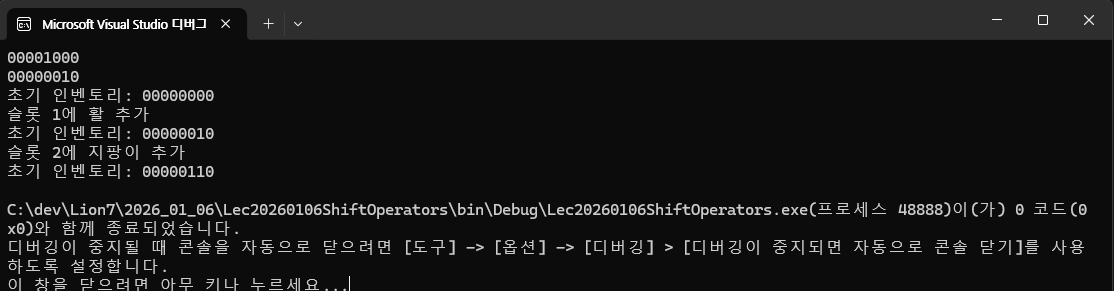
* 0번 슬롯은 없기 때문에 우측 끝칸은 빈 게 맞습니다.
16. 오늘의 과제
과제를 5개를 받았습니다.
## 💪 연습 문제

### 문제 1: RPG 체력 계산기
플레이어의 현재 체력이 80이고, 최대 체력이 100입니다.
- 몬스터에게 25의 데미지를 받았습니다
- 회복 포션으로 30을 회복했습니다
- 독 데미지로 5를 받았습니다
최종 체력을 계산하여 출력하세요.

**힌트:**
```csharp
int currentHP = 80;
int maxHP = 100;
// 각 상황을 -= 또는 += 연산자로 처리
```

**예상 출력:**
```
초기 체력: 80/100
데미지 -25: 55/100
회복 +30: 85/100
독 데미지 -5: 80/100
```

---

### 문제 2: 경험치와 레벨 계산
플레이어가 몬스터 3마리를 처치했습니다.
- 몬스터 1마리당 경험치: 150
- 레벨업에 필요한 경험치: 500

총 획득 경험치와 레벨업까지 남은 경험치를 계산하세요.

**힌트:**
```csharp
int expPerMonster = 150;
int monstersKilled = 3;
int expForLevelUp = 500;
// * 연산자와 - 연산자 사용
```

**예상 출력:**
```
처치한 몬스터: 3마리
획득 경험치: 450
레벨업까지 필요: 50
```

---

### 문제 3: 아이템 분배 시스템
파티에서 골드 1234를 획득했습니다. 파티원은 5명입니다.
- 1인당 받을 골드는 얼마인가요?
- 분배 후 남는 골드는 얼마인가요?

**힌트:**
```csharp
int totalGold = 1234;
int partyMembers = 5;
// / 연산자와 % 연산자 사용
```

**예상 출력:**
```
총 골드: 1234
파티원: 5명
1인당 골드: 246
남은 골드: 4
```

---

### 문제 4: 던전 입장 가능 여부
다음 조건을 모두 만족해야 던전에 입장할 수 있습니다:
- 플레이어 레벨이 30 이상
- 던전 열쇠를 보유하고 있음
- 체력이 50% 이상

각 조건의 참/거짓을 확인하고, 최종 입장 가능 여부를 출력하세요.

**힌트:**
```csharp
int playerLevel = 35;
int requiredLevel = 30;
bool hasKey = true;
int currentHP = 60;
int maxHP = 100;
// >=, &&, || 연산자 활용
```

**예상 출력:**
```
=== 던전 입장 조건 ===
레벨 조건 (30 이상): True
열쇠 보유: True
체력 조건 (50% 이상): True
입장 가능: True
```

---

### 문제 5: 상점 할인 계산기
아이템의 원가가 5000골드입니다.
- VIP 회원이면 20% 할인
- 쿠폰을 사용하면 추가로 500골드 할인

VIP 회원이고 쿠폰이 있을 때의 최종 가격을 계산하세요.

**힌트:**
```csharp
int originalPrice = 5000;
bool isVIP = true;
bool hasCoupon = true;
// 할인율 계산: 가격 * 0.8
// 쿠폰 할인: 가격 - 500
```

**예상 출력:**
```
원가: 5000골드
VIP 할인 (20%): 4000골드
쿠폰 할인 (-500): 3500골드
최종 가격: 3500골드
```
<실습 코드>
using System;
using System.Collections.Generic;
using System.Data;
using System.Linq;
using System.Text;
using System.Threading.Tasks;

namespace Lec20260106Mission
{
    internal class Mission20260106
    {
        static void Main(string[] args)
        {
            // Mission 1

            const int MAXHP = 100;
            int CurrentHP = 80;
            int MonsterDMG = 25;
            int HPPosion = 30;
            int PoisonDMG = 5;


            Console.WriteLine("=== 문제 1 ===");
            Console.WriteLine($"초기 체력: {CurrentHP}/{MAXHP}");
            CurrentHP -= MonsterDMG;
            Console.WriteLine($"데미지 -{MonsterDMG}: {CurrentHP}/{MAXHP}");
            CurrentHP += HPPosion;
            Console.WriteLine($"회복 +{HPPosion}: {CurrentHP}/{MAXHP}");
            CurrentHP -= PoisonDMG;
            Console.WriteLine($"독 데미지 -{PoisonDMG}: {CurrentHP}/{MAXHP}");

            // Mission 2

            int expPerMonster = 150;
            int killedMonsters = 3;
            int expForLevelUp = 500;

            Console.WriteLine("\n=== 문제 2 ===");
            Console.WriteLine($"처치한 몬스터: {killedMonsters}마리");
            Console.WriteLine($"획득 경험치: {expPerMonster* killedMonsters}");
            Console.WriteLine($"레벨업까지 필요: {expForLevelUp - expPerMonster * killedMonsters}");

            // Mission 3

            int totalGold = 1234;
            int partyMembers = 5;

            Console.WriteLine("\n=== 문제 3 ===");
            Console.WriteLine($"총 골드: {totalGold}");
            Console.WriteLine($"파티원: {partyMembers}명");
            Console.WriteLine($"1인당 골드: {totalGold/partyMembers}");
            Console.WriteLine($"남은 골드: {totalGold%partyMembers}");

            // Mission 4

            int playerLevel = 35;
            int requiredLevel = 30;
            bool hasKey = true;
            int currentHP = 60;
            int requiredHP = 50;
            int maxHP = 100;

            Console.WriteLine("\n=== 문제 4 ===");
            Console.WriteLine("\n=== 던전 입장 조건 ===");
            Console.WriteLine($"레벨 조건 ({requiredLevel} 이상): {playerLevel >= requiredLevel}");
            Console.WriteLine($"열쇠 보유: {hasKey}");
            Console.WriteLine($"체력 조건 ({requiredHP}% 이상): {currentHP >= requiredHP}");
            Console.WriteLine($"입장 가능: {playerLevel >= requiredLevel && currentHP >= requiredHP}");

            // Mission 5

            float originalPrice = 5000f;
            float DCpercentage = 20f;
            float coupon = 500f;
            bool isVIP = true;
            bool hasCoupon = true;

            Console.WriteLine("\n=== 문제 5 ===");
            Console.WriteLine($"원가: {originalPrice}");
            Console.WriteLine($"VIP 할인 ({DCpercentage}%): {originalPrice*((100-DCpercentage)/100)}");
            Console.WriteLine($"쿠폰 할인 (-{coupon}): {originalPrice * ((100 - DCpercentage) / 100)- coupon}");
            Console.WriteLine($"최종 가격: {originalPrice * ((100 - DCpercentage) / 100) - coupon}");


        }
    }
}
* 참고 - $"{}" 출력 내 참조의 경우, 결과값이 참조한 데이터의 자료형을 따라간다.
만약 originalPrice, DCpercentage를 int로 설정한다면, 나눗셈 과정에서 정수로 변환하여 계산하게 된다.
즉, 80/100 = 0이 되는 레전드 사건이 발생. 정확한 계산이 필요하다면 웬만해서는 정수형으로 타입을 지정하는 것은 지양하자.
<출력 결과>
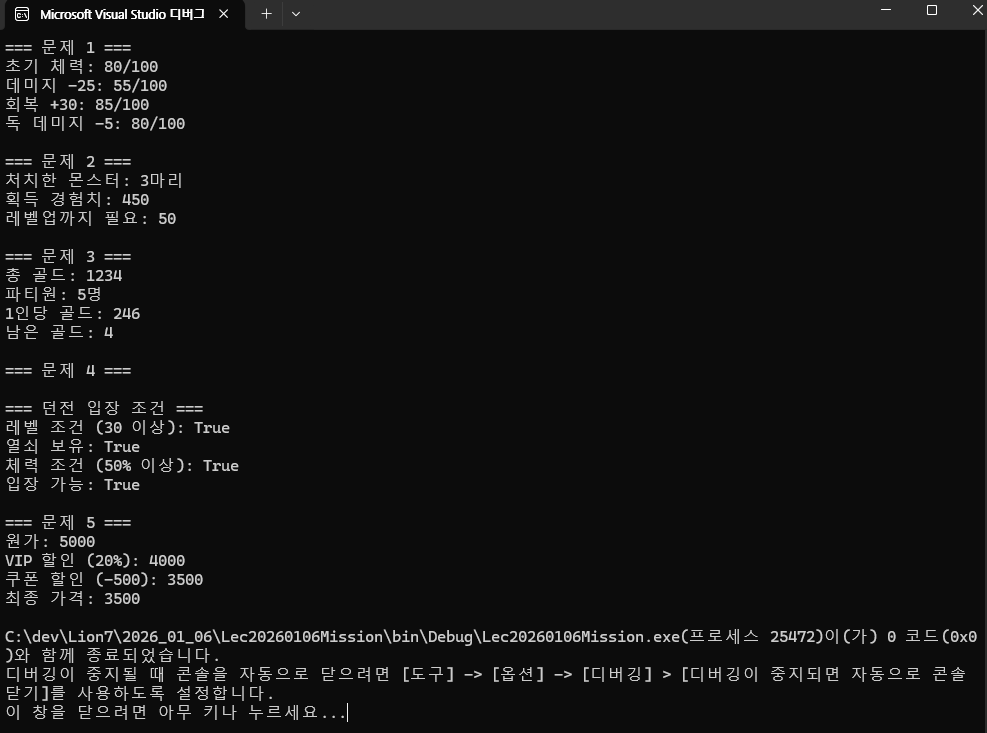
===========================================================
문자열을 입력받을 수 있게 되었다 !
형식 변환을 정확하게 사용할 수 있게 되었다 !
다양한 연산자을 알고 이를 용도에 맞게 사용할 수 있게 되었다 !