김산나
[멋쟁이사자처럼부트캠프 유니티 게임 개발 7기] 2026년 1월 12일 회고록 - 함수 본문
2026_01_12 강의 요약본
1. 함수
함수는 다음과 같이 선언한다.
반환타입 함수이름(매개변수)
{
    // 실행할 코드
    return 반환값;  // 반환타입이 void가 아닐 때
}
<실습 코드>
using System;
using System.Collections.Generic;
using System.Linq;
using System.Text;
using System.Threading.Tasks;

namespace _20260112
{
    internal class FunctionTest
    {        static void Hello()
        {
            Console.WriteLine("안녕하세요");
        }
        static void Main(string[] args)
        {
            Hello();
            Console.WriteLine("\n밑에 함수를 불러볼까요~");

            SayHello(); // 재사용성 + 가독성

            Console.WriteLine("메뉴를 불러옵니다 . . .");

            // 함수 호출
            PrintSeparater();
            ShowGameStart();
            ShowGameEnd();


        }

        // 1단계 - 기본 함수

        static void SayHello()
        {
            Console.WriteLine("안녕하세요, 용사님");
            Console.WriteLine("모험을 시작합니다.");
        }

        static void ShowGameStart()
        {
            Console.WriteLine("┏━━━━━━━━━━━━━━━━━━━━━━━━━━━━━━━━━━━┓");
            Console.WriteLine("┃         ⚔ RPG 게임 시작 ⚔         ┃");
            Console.WriteLine("┗━━━━━━━━━━━━━━━━━━━━━━━━━━━━━━━━━━━┛");
        }

        static void PrintSeparater()
        {
            Console.WriteLine("━━━━━━━━━━━━━━━━━━━━━━━━━━━━━━━━━━━━━");
        }

        static void ShowGameEnd()
        {
            Console.WriteLine("게임 종료");
        }
    }
}
<출력 결과>

2. 매개변수가 있는 함수
매개변수가 있는 함수는 함수를 호출할 때 매개변수를 받는 함수이다.
직접 예시를 보고 이해해 보자.
<실습 코드>
using System;
using System.Collections.Generic;
using System.Linq;
using System.Text;
using System.Threading.Tasks;

namespace _20260112
{
    internal class Function_1
    {
        // 매개변수가 있는 함수
        // int 넘겨보기
        static void Attack(int atk, int def)
        {
            Console.WriteLine("공격력: "+atk);
            Console.WriteLine("방어력: "+def);
        }

        // Player 정보 넘겨보기

        static void PlayerStatus(string name, int atk, int def, int dex, int luk)
        {
            Console.WriteLine($"플레이어 이름: {name}");
            Console.WriteLine($"공격력 : {atk}");
            Console.WriteLine($"방어력 : {def}");
            Console.WriteLine($"민첩성 이름: {dex}");
            Console.WriteLine($"행운: {luk}");
        }

        static void Main(string[] args)
        {
            Attack(100, 20);
            Console.WriteLine();
            PlayerStatus("김철수", 10, 10, 10, 5);
        }
    }
}
<출력 결과>

+ 추가 실습
using System;
using System.Collections.Generic;
using System.Linq;
using System.Text;
using System.Threading.Tasks;

namespace _20260112
{
    internal class Function_2
    {
        static void GreetPlayer(string playername)
        {
            Console.WriteLine($"환영합니다, {playername}님 !");
        }

        static void ShowPlayerInfo(string job, int level)
        {
            Console.WriteLine($"직업: {job}");
            Console.WriteLine($"레벨: {level}");
        }

        // 매개변수 3개 체력바 출력
        static void DrawHealthBar(int current, int Max, int barLength)
        {
            Console.Write("HP [");

            int filledLength = (int)((double)current / Max * barLength);

            for(int i = 0;i< barLength;i++)
            {
                if(i<filledLength)

                    Console.Write("■");
                else
                    Console.Write("□");

            }
            Console.WriteLine($"] {current} / {Max}");
        }

        // 데미지 계산
        static void ShowDamage(string attacker, string target, int damage)
        {
            Console.WriteLine($"{attacker}의 공격!");
            Console.WriteLine($"    {target}에게 {damage} 데미지!");
        }

        static void Main(string[] args)
        {
            // 함수 호출 시 인자 전달
            GreetPlayer("홍길동");
            Console.WriteLine();

            ShowPlayerInfo("전사", 50);
            Console.WriteLine();

            DrawHealthBar(75, 100, 20);
            DrawHealthBar(30, 100, 20);
            DrawHealthBar(100, 100, 20);
            Console.WriteLine();

            ShowDamage("플레이어", "고블린", 85);
            Console.WriteLine();

            ShowDamage("드래곤", "플레이어", 120);

        }
    }
}
<출력 결과>
3. 반환값이 있는 함수
함수는 값을 넣을 수도, 값을 뱉을 수도 있다.
return을 통해 값을 반환해보자.
<실습 코드>
using System;
using System.Collections.Generic;
using System.Linq;
using System.Text;
using System.Threading.Tasks;

namespace _20260112
{
    internal class Function_3
    {
        // 반환값이 있는 함수
        static int GetNumber()
        {
            return 42;
        }

        // 문자열 반환
        static string GetString()
        {
            return "문자열";
        }


        // 입력 + 반환
        static string ConnectMessage(string name)
        {
            return name + "님 첩속하셨습니다.";
        }

        static void Main(string[] args)
        {
            int num = GetNumber();
            string str = GetString();

            Console.WriteLine("숫자 반환: " + num);
            Console.WriteLine("문자 반환: " + str);

            string cm = ConnectMessage("천마");
            Console.WriteLine(cm);
        }
    }
}
4. 오버로딩
같은 이름의 함수를 여럿 생성할 수 있다.
매개변수가 다르면, 다른 함수로 판단한다.
<실습 코드>
using System;
using System.Collections.Generic;
using System.Linq;
using System.Text;
using System.Threading.Tasks;

namespace _20260112
{
    internal class Function_4
    {
        // 오버로딩
        static void Attack()
        {
            Console.WriteLine("기본공격");
            Console.WriteLine("데미지: 50");
        }

        // 이름이 같더라도 인자값이 다르면 다른 함수 취급
        static void Attack(string target)
        {
            Console.WriteLine($"{target} 공격!");
            Console.WriteLine("데미지: 50");
        }

        static void Attack(string target, int a)
        {
            Console.WriteLine($"{target} 공격!");
            Console.WriteLine($"데미지: {a}");
        }

        static void Attack(string skillName, string targetName, int damage)
        {
            Console.WriteLine($"스킬 발동: {skillName}");
            Console.WriteLine($"{targetName}에게 {damage} 데미지!");
        }

        static void Main(string[] args)
        {
            Attack();
            Console.WriteLine();

            Attack("플레이어");
            Console.WriteLine();

            Attack("고블린", 50);
            Console.WriteLine();

            Attack("파이어볼", "고블린", 50);

        }
    }
}
5. 매개변수 사용법
매개변수에 초기값을 설정하여 만약 값이 들어오지 않는 경우 해당 초기값으로 세팅할 수 있다.
<실습 코드>
using System;
using System.Collections.Generic;
using System.Linq;
using System.Text;
using System.Threading.Tasks;

namespace _20260112
{
    internal class Function_5
    {
        // 기본 매개변수 사용

        static void CastFireBall(string target, int damage = 100, int manaCost = 30)
        {
            // 매개변수가 입력되지 않는 경우, 상단에 적혀있는 값으로 초기화.
            Console.WriteLine($" 파이어볼 시전 ! ");
            Console.WriteLine($" 대상: {target} ");
            Console.WriteLine($" 데미지: {damage}");
            Console.WriteLine($" 마나 소모: {manaCost}");
        }
        static void Main(string[] args)
        {
            // 모든 매개변수 지정
            CastFireBall("고블린", 150, 40);
            Console.WriteLine();

            // 두 개만 지정
            CastFireBall("고블린", 20);
            Console.WriteLine();

            // 필수만 지정
            CastFireBall("드래곤");
            Console.WriteLine();

            // 중간값 생략
            CastFireBall("고블린", manaCost: 50);
            Console.WriteLine();

        }
    }
}
최하단 코드처럼 매개변수: 값의 형식으로 특정 매개변수에만 값을 할당할 수 있다.
+ 실습
using System;
using System.Collections.Generic;
using System.Linq;
using System.Runtime.Remoting.Metadata.W3cXsd2001;
using System.Text;
using System.Threading.Tasks;

namespace _20260112
{
    internal class Function_6
    {
        // 실습
        static void useItem(string usedItem, int healPoint)
        {
            Console.WriteLine($"\n{usedItem} 사용 !");
            Console.WriteLine($"회복량: {healPoint}HP");
        }

        static void spawnspell(string spawnTarget, int level, int count)
        {
            Console.WriteLine($"\n{spawnTarget} 소환");
            Console.WriteLine($"레벨: {level}");
            Console.WriteLine($"수량: {count}");
        }

        static void Main(string[] args)
        {
            useItem("회복 포션", 50);
            useItem("고급 회복 포션", 100);
            spawnspell("슬라임", 1, 1);
            spawnspell("고블린", 5, 1);
            spawnspell("드래곤", 50, 3);
        }
    }
}
6. ref
변수를 값이 아닌 주소로 참조하는 방법.
원본 데이터를 직접적으로 건드는 것이기 때문에 사용에 주의해야 한다.
다만 이런 경우에 사용한다.
1) 최적화가 필요할 때
변수의 값을 복사해서 받아오는 형식이 아닌, 주소를 알려줘 값 자체는 원본 하나가 되어 메모리를 아낄 수 있다.
2) 여러 개의 값을 반환하고 싶을 때
return은 기본적으로 하나의 값만을 반환할 수 있다. 하지만 함수 내부에서 원본 데이터 자체를 변경하는 경우, 여러 값을 반환하는 기능처럼 사용할 수 있다.
3) 상태 공유
원본 데이터값을 참조하고 있는 모든 데이터가 값 변경 시 즉각적으로 반응할 수 있다.
전역변수와 다른 점이라면 ref는 변수가 선언된 기능 안에서만 참조하는 것 + 메모리 아낌 정도가 있는 듯?
4) 외부 라이브러리와의 통신
외부 라이브러리에서 값을 받아올 때 직접적으로 값을 받아오기 위해 사용한다.
<실습 코드>
using System;
using System.Collections.Generic;
using System.Linq;
using System.Net.Mail;
using System.Text;
using System.Threading.Tasks;

namespace _20260112
{
    internal class Ref_1
    {
        static int Attack(int a)
        {
            Console.WriteLine("공격력: " + a);
            a++;
            return a; // return받은 a도 값만 같은 상태. Main의 a, Attack의 a는 값만 같아진다.
        }

        static int Attack_2(ref int a)
        {
            Console.WriteLine("공격력2: " + a);
            a++;
            return a; // return받은 a도 값만 같은 상태. Main의 a, Attack의 a는 값만 같아진다.
        }

        static void Main(string[] args)
        {
            // ref 키워드
            // C# 내부적으로 포인터를 쉽게 다룰 수 있게 만들었다.

            int a = 10;
            int b = 20;

            Attack(a); // Attack_a에 10 대입

            a = Attack(a); // Main의 a, Attack의 a는 값만 같아진다. 반환값은 11 (a++)
            Console.WriteLine("a 값: " + a);


            a = Attack_2(ref a); // 주소를 반환함. 실제로 같은 변수가 됨. - Attack에 Main_a의 주소값을 입력.(a = 11, Main_a의 값을 ++)
            b = Attack_2(ref a); // 이름이 달라도 사용 가능. 두 번째 - Attack에 Main_a의 주소값을 입력.(a = 12, Main_a의 값을 ++)
                                 // 변경된 Attack_2_a값을 b에 반환. 결국 Attack_2함수에 두 번 들어갔다 나온 Main_a와 같아진다.

        }
    }
}
+ 실습
using System;
using System.Collections.Generic;
using System.Linq;
using System.Text;
using System.Threading.Tasks;

namespace _20260112
{
    internal class ref_2
    {
        // ref 실습
        static void Main(string[] args)
        {
            int x = 10;
            int y = 20;
            int temp;

            // swap 두 개의 변수의 값을 바꿔주기.

            temp = x;
            x = y;
            y = temp;

            Console.WriteLine($"x: {x}, y: {y}\n");

            // swaper1
            Swaper1(x, y);
            Console.WriteLine($"x: {x}, y: {y}\n");

            // swaper2
            Swaper2(ref x, ref y);
            Console.WriteLine($"x: {x}, y: {y}\n");
        }

        // 일반 함수
        static void Swaper1(int a, int b)
        {
            int temp = a;
            a = b;
            b = temp;
        }

        // ref 함수
        static void Swaper2(ref int a, ref int b)
        {
            int temp = a;
            a = b;
            b = temp;
        }
    }
}
7. out
앞서 설명한 ref의 용도 중, return값을 여러 개 반환하는 것이 있었다.
out은 좀 더 안전하게 기본 return과 같은 방식으로 값만 여러 개 반환할 수 있는 기능을 한다.
사용 방법은 다음과 같다
<실습 코드>
using System;
using System.Collections.Generic;
using System.Linq;
using System.Text;
using System.Threading.Tasks;

namespace _20260112
{
    internal class out_1
    {
        // out 키워드 - 함수 내에서 초기화 후 값 반환
        static void Attack(int a, int b, out int atk, out int def)
        {
            atk = a;
            def = b;
            atk++;
            def++;
        }

        static void Main(string[] args)
        {
            int Main_atk;
            int Main_def;

            Attack(10, 20, out Main_atk, out Main_def); // a, b는 입력값, out 붙인 애들을 리턴받을 수 있다.
            Console.WriteLine($"공격력: {Main_atk}");
            Console.WriteLine($"방어력: {Main_def}");
        }
    }
}
반환하고 싶은 변수 앞에 out을 붙이고, 함수 호출한 코드에서도 out으로 붙여두면 된다.
가끔 안된다고 하는 경우가 있는데, 보통 return으로 지정된 변수들의 값이 정해지지 않은 경우이다. 구조를 잘 파악하자.

구조가 약간 복잡하니 헷갈릴 수 있다.
<출력 결과>

Main에서 Main_atk, Main_def를 선언했다.
Attack 함수를 호출해 a, b 값을 각각 10, 20으로 넣어줬고, 두 return값을 Main_atk, Main_def에 할당하였다.
Attack 함수에서는 a, b값을 각각 return값에 할당하고, +1을 하는 로직을 갖고 있다.
그런 과정으로 11, 21이 나온 것이다.
8. 전역변수
ref와 비교당한 그 전역변수이다.
전역변수란, 해당 클래스 전체에서 사용 가능한 변수이다.
전역변수는 static 자료형 변수명으로 선언한다.
static int playerHP = 100;
전역변수는 온갖 곳에서 집어다 쓰는 만큼, 남용하면 goto문과 비슷하게 스파게티 코드가 되기 쉽다.
용도를 잘 알고 사용하자.
- 프로그램 전체의 "설정값" 관리: 사운드 볼륨, 언어 등 ...
- "매니저" 객체: 가령 턴제 전투의 현재 턴인 대상을 지정해 주는 매니저 객체가 있다.
- 데이터가 저장되지 않는... 공통적으로 자주 쓰이는 계산 공식
<안 좋은 예>
using System;

class BadExample
{
    // 전역변수들
    static int playerHP = 100;
    static int playerMP = 50;
    static int enemyHP = 80;
    static int damage = 0;
    static bool gameOver = false;

    static void PlayerAttack()
    {
        // 어디서 값이 변경되는지 추적하기 어려움
        damage = 30;
        enemyHP -= damage;

        if (enemyHP <= 0)
        {
            gameOver = true;  // 전역변수 직접 수정
        }
    }

    static void EnemyAttack()
    {
        damage = 20;  // 이전 damage 값이 사라짐!
        playerHP -= damage;

        if (playerHP <= 0)
        {
            gameOver = true;
        }
    }

    static void UsePotion()
    {
        playerHP += 30;  // 최대 HP 체크 없음
        playerMP -= 10;  // 음수 체크 없음
    }

    static void Main(string[] args)
    {
        PlayerAttack();
        Console.WriteLine($"적 HP: {enemyHP}");

        EnemyAttack();
        Console.WriteLine($"플레이어 HP: {playerHP}");

        // 문제: damage 값이 어떻게 변했는지 알 수 없음
        Console.WriteLine($"마지막 데미지: {damage}");
    }
}
GPT가 똥코드도 기가막히게 잘 짜준다.
각종 스텟(현재 스텟), 데미지까지 전역으로 선언해버렸다.
최대값같이 잘 변하지 않는 값을 정하면 모를까, 계속 변하는 값을 전역으로 선언하고 마구잡이로 쓰면 로직 파악이 어렵다.
저런 건 지역변수로 선언하고, 함수의 리턴값을 받아 쓰는 게 가장 좋다.
<숙련된 조교의 코드>
using System;

class StaticVar_1
{
    static int CalculateDamage(int attack, int defense)
    {
        int damage = attack - defense / 2;
        if (damage < 0) damage = 0;
        return damage;  // 결과를 명확하게 반환
    }

    static int ApplyDamage(int currentHP, int damage)
    {
        int newHP = currentHP - damage;
        if (newHP < 0) newHP = 0;
        return newHP;  // 새로운 값 반환
    }

    static int UsePotion(int currentHP, int maxHP, int healAmount)
    {
        int newHP = currentHP + healAmount;
        if (newHP > maxHP) newHP = maxHP;  // 최대값 체크
        return newHP;
    }

    static bool IsAlive(int hp)
    {
        return hp > 0;
    }

    static void Main(string[] args)
    {
        // 지역변수로 상태 관리
        int playerHP = 100;
        int playerMaxHP = 100;
        int enemyHP = 80;

        // 명확한 데이터 흐름
        int playerDamage = CalculateDamage(50, 20);
        enemyHP = ApplyDamage(enemyHP, playerDamage);
        Console.WriteLine($"적에게 {playerDamage} 데미지!");
        Console.WriteLine($"적 HP: {enemyHP}");

        int enemyDamage = CalculateDamage(30, 10);
        playerHP = ApplyDamage(playerHP, enemyDamage);
        Console.WriteLine($"\n플레이어가 {enemyDamage} 데미지 받음!");
        Console.WriteLine($"플레이어 HP: {playerHP}");

        // 포션 사용
        playerHP = UsePotion(playerHP, playerMaxHP, 30);
        Console.WriteLine($"\n포션 사용! HP: {playerHP}");

        // 상태 확인
        if (IsAlive(playerHP) && !IsAlive(enemyHP))
        {
            Console.WriteLine("\n승리!");
        }
    }
}
이런 식이다.어느 함수에 어떤 값이 필요했고, 결과값이 무엇인지도 명확하다.
그리고 버그도 없음
9. 재귀함수
말 그대로 자기 자신을 호출하는 함수이다.
무한 루프가 기본인 while을 보는 것 같다...
그래서 얘도 탈출 조건을 만들어야 한다.
다음 예제는 1부터 10까지 (정수만) 더하는 재귀함수이다.
<실습 코드>
using System;
using System.Collections.Generic;
using System.Linq;
using System.Text;
using System.Threading.Tasks;

namespace _20260112
{
    internal class RecursiveFunction
    {
        static void Main(string[] args)
        {
            // 재귀함수 - 자기 자신을 호출

            // 1부터 n까지의 합 구하기
            int sum = SumToN(10);
            Console.WriteLine("1 + 2 + 3 + ... + 10: " + sum);
        }

        // 1부터 n까지의 합 구하기
        static int SumToN(int n)
        {
            if (n <= 0)
            {
                return 0;
            }

            return n + SumToN(n - 1);
        }
    }
}
이런 식으로 되는 것...
재귀함수가 왜 어려운가 했는데, 원리보다 활용처가 좀 얏같은 면이 있어 그런 듯하다.
~재귀함수를 사용해보자~
계층형 구조 탐색 (폴더, 트리 등)
분할 정복 (정렬, 이진탐색)
경우의 수와 탐색 (DFS 등)
.
.
.
알고리즘 구현에 효자 역할을 한다.
얘만 할 수 있는 건 아닌데 재귀함수를 쓰면 코드가 깔끔해져서 애용한다.
단점이라면 메모리를 많이 잡아먹는다. 회귀하시는대로 잡아먹는다고 봐도 무방.
<출력 결과>

10. 오늘의 미션
문제 1: 평균 계산 함수
정수 배열을 받아 평균을 반환하는 함수를 만드세요.
<출력 결과>
using System;
using System.Collections.Generic;
using System.Linq;
using System.Text;
using System.Threading;
using System.Threading.Tasks;

namespace _20260112
{
    internal class Mission1
    {
        // 실습 1 - 평균 계산 함수
        static void Main(string[] args)
        {
            double avr = Aver();
            Console.WriteLine("평균: " + avr);
        }

        static double Aver()
        {
            double sum = 0;
            string[] n = Console.ReadLine().Split();
            int[] x = new int[n.Length];
            for (int i =0;i<n.Length;i++)
            {
                x[i] = int.Parse(n[i]);
                sum += x[i];
            }
            return sum/n.Length;
        }


    }
}
<출력 결과>

문제 2: 등급 판별 함수
점수를 받아 A, B, C, D, F 등급을 반환하는 함수를 만드세요.
<출력 결과>
using System;
using System.Collections.Generic;
using System.Linq;
using System.Text;
using System.Threading.Tasks;

namespace _20260112
{
    internal class Mission2
    {
        static void Main(string[] args)
        {
            Console.Write("점수를 입력하세요: ");
            int score = int.Parse(Console.ReadLine());
            string playerGrade = grader(score);

            Console.WriteLine($"당신은 {playerGrade}등급 입니다.");
        }

        static string grader (int score)
        {
            if(score>= 90)
            {
                return "A";
            }else if(score >= 80)
            {
                return "B";
            }
            else if (score >= 70)
            {
                return "C";
            }
            else if (score >= 60)
            {
                return "D";
            }
            else
            {
                return "F";
            }
        }
    }
}
<출력 결과>

문제 3: 소수 판별 함수
숫자를 받아 소수인지 판별하는 함수를 만드세요.
<출력 결과>
using System;
using System.Collections.Generic;
using System.Linq;
using System.Text;
using System.Threading.Tasks;

namespace _20260112
{
    internal class Mission3
    {
        static void Main(string[] args)
        {
            Console.Write("값를 입력하세요: ");
            int input = int.Parse(Console.ReadLine());
            bool isPrimeNum = Checker(input);

            Console.WriteLine(isPrimeNum == true ? "이 값은 소수입니다" : "이 값은 소수가 아닙니다.");
        }

        static bool Checker(int input)
        {
            bool temp = false;
            bool result = true;

            if (input != 1)
            {
                for (int i = 2; i <= input - 1; i++)
                {
                    if (input % i == 0)
                    {
                        temp = false;
                    }
                    else
                    {
                        temp = true;
                    }
                    if (temp == false)
                        result = false;
                }
                if (result == true) return true;
                else return false;
            }
            else return false;


        }
    }
}
<출력 결과>



문제 4: 경험치 시스템
현재 경험치와 획득 경험치를 받아
레벨업 여부와 새 경험치를 반환하는 함수를 만드세요. (out 사용)
<출력 결과>
using System;
using System.Collections.Generic;
using System.Linq;
using System.Text;
using System.Threading.Tasks;

namespace _20260112
{
    internal class Mission4
    {
        static void Main(string[] args)
        {
            Console.Write("현재 경험치: ");
            int curentExp = int.Parse(Console.ReadLine());
            Console.Write("획득한 경험치: ");
            int getExp = int.Parse(Console.ReadLine());
            bool levelUp = false;

            expCounter(curentExp, getExp, out levelUp, out curentExp);

            if (levelUp == true)
            {
                Console.WriteLine($"레벨 업!");
                Console.WriteLine($"현재 경험치: {curentExp}");
            }else
            {
                Console.WriteLine($"현재 경험치: {curentExp}");
            }
        }
        static void expCounter(int currenstExp, int getExp, out bool levelUp, out int currentExp)
        {
            int fullExp = 100;
            levelUp = false;


            if (currenstExp + getExp >= fullExp)
            {
                levelUp = true;
                currentExp = currenstExp + getExp - fullExp;
            }
            else
            {
                levelUp = false;
                currentExp = currenstExp + getExp;
            }

        }
    }
}
대충 레벨업에 필요한 경험치는 100으로 잡았다.
<출력 결과>

문제 5: 아이템 강화 시스템
강화 레벨에 따라 성공 확률이 달라지는
아이템 강화 시스템을 함수로 구현하세요.
<출력 결과>
using System;
using System.Collections.Generic;
using System.Linq;
using System.Text;
using System.Threading.Tasks;

namespace _20260112
{
    internal class Mission5
    {
        static void Main(string[] args)
        {
            int level = 0;

            while (level < 10)
            {
                Console.WriteLine("강화하려면 엔터를 눌러주세요.");
                Console.ReadLine();
                level = Reinforce(level);
                Console.WriteLine($"현재 강화 레벨: {level}");
            }
        }

        static int Reinforce(int level)
        {
            Random rnd = new Random();

            int result = rnd.Next(0, 101);

            if(result <= (101 - (level * 10))*0.3 && result > 0)
            {
                Console.WriteLine($"강화 성공 !");
                return level+1
                    ;
            }
            else
            {
                Console.WriteLine($"강화 실패...");
                return level;
            }
        }
    }
}
구간별로 자르자면 또 if문이 길게 적힐 거 같아서 레벨이 오를 때마다 판정 구간을 줄이는 방식으로 구현했다만...
잘 돌아가는지 테스트만으로는 알 수가 없다. 확률 갓겜인 탓에...
<출력 결과>
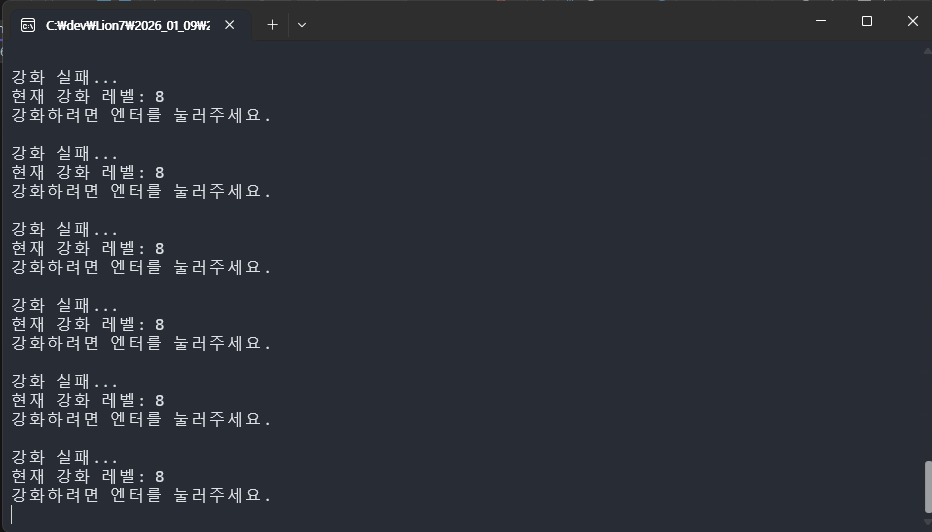
마의 8구간에서 드랍했다.
+
선생님께서 웹 개발 꿀팁을 주셨다
opencode + git 코파일럿 + netify + react + supabase
딸깍하기 참 좋은 조합이긴 한데, 보안 이슈 + 제대로 꾸미려면 웹을 배우긴 해야 할 것 같다.
===========================================================
다양한 함수를 사용할 수 있게 되었다 !
ref, out을 사용할 수 있게 되었다 !
전역변수, 재귀함수를 사용할 수 있게 되었다 !