
김산나
[멋쟁이사자처럼부트캠프 유니티 게임 개발 7기] 2026년 1월 14일 회고록 - 슈팅게임, 상속 본문
2026_01_14 강의 요약본
1. 클래스 간 통신
한 객체가 다른 객체의 값을 불러오고 수정하는 방법을 알아보자.
어제 배운 프로퍼티를 활용하면 private 변수도 사용할 수 있다.
public void SetHp(int hp)
{
    this.hp = hp;
}

public int GetHp() { return hp; }
위쪽은 hp값을 변경하는 프로퍼티, 아래쪽은 hp값을 뱉는 프로퍼티이다.
이걸 활용하면
monster.SetHp(monster.GetHp() - player.GetAtk());   // 플레이어 -> 몬스터
player.SetHp(player.GetHp() - monster.GetAtk());    // 몬스터 -> 플레이어
이런 게 가능하다.
몬스터의 HP를 몬스터의 HP - 플레이어의 공격력으로 변경할 수 있다.
<실습 코드>
using System;
using System.Collections.Generic;
using System.Linq;
using System.Text;
using System.Threading.Tasks;

namespace _20260114
{
    // 클래스끼리 통신
    class Player_
    {
        private int hp;
        private int atk;

        public void SetHp(int hp)
        {
            this.hp = hp;
        }

        public void SetAtk(int atk)
        {
            this.atk = atk;
        }
        public int GetHp() { return hp; }

        public int GetAtk() { return atk; }


        public void Render()
        {
            Console.WriteLine("\n플레이어");
            Console.WriteLine("체력: " + hp);
            Console.WriteLine("공격력: " + atk);
        }

    }

    class Monster
    {
        private int hp;
        private int atk;
        public void SetHp(int hp)
        {
            this.hp = hp;
        }

        public void SetAtk(int atk)
        {
            this.atk = atk;
        }
        public int GetHp() { return hp; }

        public int GetAtk() { return atk; }
        public void Render()
        {
            Console.WriteLine("\n몬스터");
            Console.WriteLine("체력: " + hp);
            Console.WriteLine("공격력: " + atk);
        }

    }


    internal class Class_1
    {
        static void Main(string[] args)
        {
            // 플레이어 객체 생성
            Player_ player = new Player_();
            player.SetAtk(10);
            player.SetHp(100);

            // 몬스터 객체 생성
            Monster monster = new Monster();
            monster.SetAtk(10);
            monster.SetHp(100);

            // 공격
            monster.SetHp(monster.GetHp() - player.GetAtk());   // 플레이어 -> 몬스터
            player.SetHp(player.GetHp() - monster.GetAtk());    // 몬스터 -> 플레이어

            player.Render();
            monster.Render();

        }
    }
}
<출력 결과>
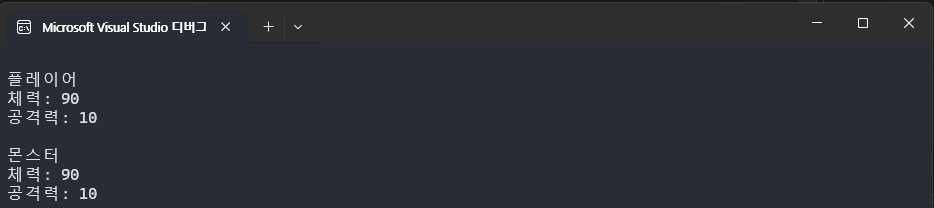
정상적으로 10씩 감소한 것을 확인할 수 있다.
2. 슈팅게임 만들기 !
<전체 코드>
using System;
using System.Collections.Generic;
using System.ComponentModel;
using System.Linq;
using System.Runtime.InteropServices;
using System.Security.Cryptography.X509Certificates;
using System.Text;
using System.Threading.Tasks;
namespace _20260114
{
// 미사일 클래스
public class BULLET
{
public int x;
public int y;
public bool fire;
}
// 플레이어 클래스
public class Player
{
[DllImport("msvcrt.dll")]
static extern int _getch();
public int playerX;
public int playerY;
public BULLET[] playerBullet = new BULLET[20]; // 미사일 20개 생성 후 준비된 미사일을 활용 -> Unity: 오브젝트 풀
public BULLET[] playerBullet2 = new BULLET[20];
public BULLET[] playerBullet3 = new BULLET[20];
public int Score = 100;
// 아이템
public Item item = new Item();
public int itemCount = 0;
public Player() // 플레이어 초기값
{
// 플레이어 좌표 위치 초기화
playerX = 0;
playerY = 12;
for (int i = 0; i < 20; i++) // 총알 20개 초기화
{
playerBullet[i] = new BULLET(); // 객체 생성
playerBullet[i].x = 0;
playerBullet[i].y = 0;
playerBullet[i].fire = false;
playerBullet2[i] = new BULLET(); // 객체 생성
playerBullet2[i].x = 0;
playerBullet2[i].y = 0;
playerBullet2[i].fire = false;
playerBullet3[i] = new BULLET(); // 객체 생성
playerBullet3[i].x = 0;
playerBullet3[i].y = 0;
playerBullet3[i].fire = false;
}
}
public void GameMain()
{
// 키를 입력받는 부분
KeyControl();
// 플레이어를 그려주는 부분
PlayerDraw();
// UI 점수판
UIscore();
if(item.ItemLife)
{
item.ItemDraw();
// 아이템 충돌
CrashItem();
}
}
// 아이템 충돌이 일어나면 양쪽으로 미사일 발사
public void CrashItem()
{
if(playerY +1 == item.itemY)
{
if(playerX >= item.itemX-2 && playerX <= item.itemX +2)
{
item.ItemLife = false;
if(itemCount < 3)
{
itemCount++;
}
}
}
}
public void KeyControl()
{
int pressKey; // 정수형 변수 선언, 키값 받는 변수
if (Console.KeyAvailable)
{
pressKey = _getch();
if (pressKey == 224) // 지연 줄이기
pressKey = _getch();
switch (pressKey)
{
case 72: // 위
playerY--;
if (playerY < 1) playerY = 0;
break;
case 75: // 왼쪽
playerX--;
if (playerX < 0) playerX = 0;
break;
case 77: // 오른쪽
playerX++;
if (playerX > 75) playerX = 75;
break;
case 80: // 아래
playerY++;
if (playerY > 21) playerY = 21;
break;
case 32: // Space - 미사일 발사
for (int i = 0; i < 20; i++)
{
if (playerBullet[i].fire == false)
{
playerBullet[i].fire = true;
// 플레이어 앞에서 미사일 쏘기
playerBullet[i].x = playerX + 5;
playerBullet[i].y = playerY + 1;
// 한 발씩 쏘겠다.
break;
}
}
for (int i = 0; i < 20; i++)
{
if (playerBullet2[i].fire == false)
{
playerBullet2[i].fire = true;
// 플레이어 앞에서 미사일 쏘기
playerBullet2[i].x = playerX + 5;
playerBullet2[i].y = playerY + 1+1; // 2번 미사일을 상단에서 나오게 하기 위해 y + 1
// 한 발씩 쏘겠다.
break;
}
}
for (int i = 0; i < 20; i++)
{
if (playerBullet3[i].fire == false)
{
playerBullet3[i].fire = true;
// 플레이어 앞에서 미사일 쏘기
playerBullet3[i].x = playerX + 5;
playerBullet3[i].y = playerY + 1 - 1; // 3번미사일을 하단에서 나오게 하기 위해 y - 1
// 한 발씩 쏘겠다.
break;
}
}
break;
}
}
}
// 미사일 그리기
public void BulletDraw()
{
string bullet = "->";
for (int i = 0; i < 20; i++)
{
if (playerBullet[i].fire == true)
{
// 좌표 설정. 중간 위치 보정을 위해 x -1
Console.SetCursorPosition(playerBullet[i].x - 1, playerBullet[i].y);
Console.Write(bullet);
playerBullet[i].x++; // 미사일 오른쪽으로 날리기
if (playerBullet[i].x > 78)
{
playerBullet[i].fire = false; // 다시 준비 상태
}
}
}
}
public void BulletDraw2()
{
string bullet = "->";
for (int i = 0; i < 20; i++)
{
if (playerBullet2[i].fire == true)
{
// 좌표 설정. 중간 위치 보정을 위해 x -1,
Console.SetCursorPosition(playerBullet2[i].x - 1, playerBullet2[i].y);
Console.Write(bullet);
playerBullet2[i].x++; // 미사일 오른쪽으로 날리기
if (playerBullet2[i].x > 78)
{
playerBullet2[i].fire = false; // 다시 준비 상태
}
}
}
}
public void BulletDraw3()
{
string bullet = "->";
for (int i = 0; i < 20; i++)
{
if (playerBullet3[i].fire == true)
{
// 좌표 설정. 중간 위치 보정을 위해 x -1,
Console.SetCursorPosition(playerBullet3[i].x - 1, playerBullet3[i].y);
Console.Write(bullet);
playerBullet3[i].x++; // 미사일 오른쪽으로 날리기
if (playerBullet3[i].x > 78)
{
playerBullet3[i].fire = false; // 다시 준비 상태
}
}
}
}
public void PlayerDraw()
{
string[] player =
{
"->",
">>>",
"->"
}; // 배열 문자열로 그리기
for (int i = 0; i < player.Length; i++)
{
Console.SetCursorPosition(playerX, playerY + i);
Console.WriteLine(player[i]);
}
}
public void UIscore()
{
Console.SetCursorPosition(63, 0);
Console.Write("┏━━━━━━━━━━━━━━┓");
Console.SetCursorPosition(63, 1);
Console.Write("┃ ┃");
Console.SetCursorPosition(65, 1);
Console.Write("Score : " + Score);
Console.SetCursorPosition(63, 2);
Console.Write("┗━━━━━━━━━━━━━━┛");
}
// 충돌 처리
public void clashEnemyAndBullet(Enemy enemy)
{
for (int i = 0; i < 20; i++)
{
// 살아 있는 미사일
if (playerBullet[i].fire == true)
{
// 미사일과 적의 y값이 같을 때
if (playerBullet[i].y == enemy.enemyY)
{
if (playerBullet[i].x >= (enemy.enemyX - 1) && playerBullet[i].x <= (enemy.enemyX + 1))
{
// 아이템 생성
item.ItemLife = true;
item.itemX = enemy.enemyX;
item.itemY = enemy.enemyY;
// 충돌 후 재생성
Random rand = new Random();
enemy.enemyX = 75;
enemy.enemyY = rand.Next(2, 22);
// 미사일도 준비상태로
playerBullet[i].fire = false;
// 스코어
Score += 100;
}
}
}
}
// 미사일 2
for (int i = 0; i < 20; i++)
{
// 살아 있는 미사일
if (playerBullet2[i].fire == true)
{
// 미사일과 적의 y값이 같을 때
if (playerBullet2[i].y == enemy.enemyY)
{
if (playerBullet2[i].x >= (enemy.enemyX - 1) && playerBullet2[i].x <= (enemy.enemyX + 1))
{
// 아이템 생성
//item.ItemLife = true;
//item.itemX = enemy.enemyX;
//item.itemY = enemy.enemyY;
// 충돌 후 재생성
Random rand = new Random();
enemy.enemyX = 75;
enemy.enemyY = rand.Next(2, 22);
// 미사일도 준비상태로
playerBullet2[i].fire = false;
// 스코어
Score += 100;
}
}
}
}
// 미사일 3
for (int i = 0; i < 20; i++)
{
// 살아 있는 미사일
if (playerBullet3[i].fire == true)
{
// 미사일과 적의 y값이 같을 때
if (playerBullet3[i].y == enemy.enemyY)
{
if (playerBullet3[i].x >= (enemy.enemyX - 1) && playerBullet3[i].x <= (enemy.enemyX + 1))
{
//// 아이템 생성
//item.ItemLife = true;
//item.itemX = enemy.enemyX;
//item.itemY = enemy.enemyY;
// 충돌 후 재생성
Random rand = new Random();
enemy.enemyX = 75;
enemy.enemyY = rand.Next(2, 22);
// 미사일도 준비상태로
playerBullet3[i].fire = false;
// 스코어
Score += 100;
}
}
}
}
}
}
// 적 클래스
public class Enemy
{
public int enemyX;
public int enemyY;
public Enemy()
{
enemyX = 77;
enemyY = 12;
}
public void EnemyDraw()
{
string enemy = "<-0->"; // 문자열로 표현
Console.SetCursorPosition(enemyX, enemyY);
Console.WriteLine(enemy); // 출력
}
public void EnemyMove()
{
Random rand = new Random();
enemyX--; // 왼쪽으로 움직임
if (enemyX < 2) // 화면 넘어가면 새로 좌표 만들기
{
enemyX = 75;
enemyY = rand.Next(2, 22);
}
}
}
// 아이템 클래스
public class Item
{
public string Itemname;
public string ItemSprite;
public int itemX = 0;
public int itemY = 0;
public bool ItemLife = false;
public void ItemDraw()
{
Console.SetCursorPosition(itemX, itemY);
ItemSprite = "Item★";
Console.Write(ItemSprite);
}
}
internal class shootingGame
{
static void Main(string[] args)
{
Console.CursorVisible = false;
Console.SetWindowSize(80, 25);
Console.SetBufferSize(80, 25);
// 플레이어 생성
Player player = new Player();
// 적 생성
Enemy enemy = new Enemy();
// frame 설정 (60fps)
int dwTime = Environment.TickCount;
while(true)
{
if(dwTime + 50 < Environment.TickCount)
{
// 현재시간 세팅
dwTime = Environment.TickCount;
Console.Clear();
// 플레이어
player.GameMain();
// 총알
if (player.itemCount == 0)
{
player.BulletDraw();
}
else if (player.itemCount == 1)
{
player.BulletDraw();
player.BulletDraw2();
}
else
{
player.BulletDraw();
player.BulletDraw2();
player.BulletDraw3();
}
// 적
enemy.EnemyMove();
enemy.EnemyDraw();
// 충돌처리
player.clashEnemyAndBullet(enemy);
}
}
}
}
}
하나씩 천천히 알아보자.
1. 미사일 클래스
// 미사일 클래스
public class BULLET
{
    public int x;
    public int y;

    public bool fire;
}
미사일의 위치, 미사일의 발사 여부를 확인할 수 있는 구조로 되어있다.
2. 플레이어 클래스 - 필드
public class Player
{
    [DllImport("msvcrt.dll")]
    static extern int _getch();

    public int playerX;
    public int playerY;

    public BULLET[] playerBullet = new BULLET[20]; // 미사일 20개 생성 후 준비된 미사일을 활용  -> Unity: 오브젝트 풀
    public BULLET[] playerBullet2 = new BULLET[20];
    public BULLET[] playerBullet3 = new BULLET[20];
    public int Score = 100;

    // 아이템
    public Item item = new Item();
    public int itemCount = 0;
첫 두 줄은 C 라이브러리에서 가져온 그 내용이다.
그 다음은 플레이어 위치 (x,y)
다음은 미사일의 선언이다. (BULLET[] playerBullet)
아이템을 하나 먹을 때마다 미사일이 하나 씩 추가되기 때문에 세 개를 선언하였다.
다음은 점수(Score), 마지막 두 줄은 아이템 객체를 선언하는 코드와 아이템을 먹은 개수를 카운트해주는 변수이다.
3. 플레이어 클래스 - 생성자
public Player() // 플레이어 초기값
{
    // 플레이어 좌표 위치 초기화
    playerX = 0;
    playerY = 12;

    for (int i = 0; i < 20; i++) // 총알 20개 초기화
    {
        playerBullet[i] = new BULLET(); // 객체 생성
        playerBullet[i].x = 0;
        playerBullet[i].y = 0;
        playerBullet[i].fire = false;

        playerBullet2[i] = new BULLET(); // 객체 생성
        playerBullet2[i].x = 0;
        playerBullet2[i].y = 0;
        playerBullet2[i].fire = false;

        playerBullet3[i] = new BULLET(); // 객체 생성
        playerBullet3[i].x = 0;
        playerBullet3[i].y = 0;
        playerBullet3[i].fire = false;
    }
}
초기값을 설정해 준다. 플레이어는 좌측 중앙에서 시작한다. (높이 25)
그리고 미사일들은 for문을 통해 20개 모두 객체를 생성하고, 초기값을 지정해 준다.
4. 플레이어 클래스 - GameMain 함수
public void GameMain()
{
    // 키를 입력받는 부분
    KeyControl();

    // 플레이어를 그려주는 부분
    PlayerDraw();

    // UI 점수판
    UIscore();

    if(item.ItemLife)
    {
        item.ItemDraw();

        // 아이템 충돌
        CrashItem();
    }
}
게임의 전반적인 흐름을 작동시키는 함수.
키를 입력받고 - 플레이어를 그리고 - UI점수판을 띄우고 - 아이템도 그리고 충돌 판정도 한다.
이걸 빠르게 반복하면 자연스럽게 게임이 그려지는 것이다.
5. 플레이어 클래스 - 아이템 충돌 판정 함수
// 아이템 충돌이 일어나면 양쪽으로 미사일 발사
public void CrashItem()
{
    if(playerY +1 == item.itemY)
    {
        if(playerX >= item.itemX-2 && playerX <= item.itemX +2)
        {
            item.ItemLife = false;
            if(itemCount < 3)
            {
                itemCount++;
            }
        }
    }
}
if문을 통해 아이템과 플레이어의 위치가 같은지 판정하고
같다면 아이템을 획득한 거니까 아이템을 죽이고, 아이템 획득 카운트를 1 상승시킨다.
6. 플레이어 클래스 - 키보드 컨트롤 함수
public void KeyControl()
{

    int pressKey;   // 정수형 변수 선언, 키값 받는 변수

    if (Console.KeyAvailable)
    {
        pressKey = _getch();

        if (pressKey == 224)        // 지연 줄이기
            pressKey = _getch();

        switch (pressKey)
        {
            case 72:    // 위
                playerY--;
                if (playerY < 1) playerY = 0;
                break;

            case 75:    // 왼쪽
                playerX--;
                if (playerX < 0) playerX = 0;
                break;

            case 77:    // 오른쪽
                playerX++;
                if (playerX > 75) playerX = 75;
                break;
            case 80:    // 아래
                playerY++;
                if (playerY > 21) playerY = 21;
                break;
            case 32:    // Space - 미사일 발사
                for (int i = 0; i < 20; i++)
                {
                    if (playerBullet[i].fire == false)
                    {
                        playerBullet[i].fire = true;

                        // 플레이어 앞에서 미사일 쏘기
                        playerBullet[i].x = playerX + 5;
                        playerBullet[i].y = playerY + 1;

                        // 한 발씩 쏘겠다.
                        break;
                    }
                }

                for (int i = 0; i < 20; i++)
                {
                    if (playerBullet2[i].fire == false)
                    {
                        playerBullet2[i].fire = true;

                        // 플레이어 앞에서 미사일 쏘기
                        playerBullet2[i].x = playerX + 5;
                        playerBullet2[i].y = playerY + 1+1; // 2번 미사일을 상단에서 나오게 하기 위해 y + 1

                        // 한 발씩 쏘겠다.
                        break;
                    }
                }

                for (int i = 0; i < 20; i++)
                {
                    if (playerBullet3[i].fire == false)
                    {
                        playerBullet3[i].fire = true;

                        // 플레이어 앞에서 미사일 쏘기
                        playerBullet3[i].x = playerX + 5;
                        playerBullet3[i].y = playerY + 1 - 1;  // 3번미사일을 하단에서 나오게 하기 위해 y - 1

                        // 한 발씩 쏘겠다.
                        break;
                    }
                }
                break;
        }
    }
}
키 입력을 받아 그에 맞는 결과값을 출력해주는 함수이다.
상하좌우는 캐릭터를 움직이기만 하면 되기 때문에 짧은데, 스페이스바를 통해 미사일을 발사했을 때 어떻게 해야하는지에 대한 로직이 길어서 코드가 제법 길다.
int pressKey; - 키값을 받을 변수 생성
pressKey = _getch(); - 생성한 변수에 실제 키보드 입력값 주입
* 중요 if (pressKey == 224)
pressKey = _getch();
이거 없으면 두 번 눌러야 입력을 알아듣는다. 이 함수에 사용한 아스키코드의 분류를 명시하는026_01_14 강의 요약본
1. 클래스 간 통신
한 객체가 다른 객체의 값을 불러오고 수정하는 방법을 알아보자.
어제 배운 프로퍼티를 활용하면 private 변수도 사용할 수 있다.
public void SetHp(int hp)
{
this.hp = hp;
}
public int GetHp() { return hp; }
위쪽은 hp값을 변경하는 프로퍼티, 아래쪽은 hp값을 뱉는 프로퍼티이다.
이걸 활용하면
monster.SetHp(monster.GetHp() - player.GetAtk()); // 플레이어 -> 몬스터
player.SetHp(player.GetHp() - monster.GetAtk()); // 몬스터 -> 플레이어
이런 게 가능하다.
몬스터의 HP를 몬스터의 HP - 플레이어의 공격력으로 변경할 수 있다.
<실습 코드>
using System;
using System.Collections.Generic;
using System.Linq;
using System.Text;
using System.Threading.Tasks;
namespace _20260114
{
// 클래스끼리 통신
class Player_
{
private int hp;
private int atk;
public void SetHp(int hp)
{
this.hp = hp;
}
public void SetAtk(int atk)
{
this.atk = atk;
}
public int GetHp() { return hp; }
public int GetAtk() { return atk; }
public void Render()
{
Console.WriteLine("\n플레이어");
Console.WriteLine("체력: " + hp);
Console.WriteLine("공격력: " + atk);
}
}
class Monster
{
private int hp;
private int atk;
public void SetHp(int hp)
{
this.hp = hp;
}
public void SetAtk(int atk)
{
this.atk = atk;
}
public int GetHp() { return hp; }
public int GetAtk() { return atk; }
public void Render()
{
Console.WriteLine("\n몬스터");
Console.WriteLine("체력: " + hp);
Console.WriteLine("공격력: " + atk);
}
}
internal class Class_1
{
static void Main(string[] args)
{
// 플레이어 객체 생성
Player_ player = new Player_();
player.SetAtk(10);
player.SetHp(100);
// 몬스터 객체 생성
Monster monster = new Monster();
monster.SetAtk(10);
monster.SetHp(100);
// 공격
monster.SetHp(monster.GetHp() - player.GetAtk()); // 플레이어 -> 몬스터
player.SetHp(player.GetHp() - monster.GetAtk()); // 몬스터 -> 플레이어
player.Render();
monster.Render();
}
}
}
<출력 결과>

정상적으로 10씩 감소한 것을 확인할 수 있다.
2. 슈팅게임 만들기 !
<전체 코드>
using System;
using System.Collections.Generic;
using System.ComponentModel;
using System.Linq;
using System.Runtime.InteropServices;
using System.Security.Cryptography.X509Certificates;
using System.Text;
using System.Threading.Tasks;
namespace _20260114
{
// 미사일 클래스
public class BULLET
{
public int x;
public int y;
public bool fire;
}
// 플레이어 클래스
public class Player
{
[DllImport("msvcrt.dll")]
static extern int _getch();
public int playerX;
public int playerY;
public BULLET[] playerBullet = new BULLET[20]; // 미사일 20개 생성 후 준비된 미사일을 활용 -> Unity: 오브젝트 풀
public BULLET[] playerBullet2 = new BULLET[20];
public BULLET[] playerBullet3 = new BULLET[20];
public int Score = 100;
// 아이템
public Item item = new Item();
public int itemCount = 0;
public Player() // 플레이어 초기값
{
// 플레이어 좌표 위치 초기화
playerX = 0;
playerY = 12;
for (int i = 0; i < 20; i++) // 총알 20개 초기화
{
playerBullet[i] = new BULLET(); // 객체 생성
playerBullet[i].x = 0;
playerBullet[i].y = 0;
playerBullet[i].fire = false;
playerBullet2[i] = new BULLET(); // 객체 생성
playerBullet2[i].x = 0;
playerBullet2[i].y = 0;
playerBullet2[i].fire = false;
playerBullet3[i] = new BULLET(); // 객체 생성
playerBullet3[i].x = 0;
playerBullet3[i].y = 0;
playerBullet3[i].fire = false;
}
}
public void GameMain()
{
// 키를 입력받는 부분
KeyControl();
// 플레이어를 그려주는 부분
PlayerDraw();
// UI 점수판
UIscore();
if(item.ItemLife)
{
item.ItemDraw();
// 아이템 충돌
CrashItem();
}
}
// 아이템 충돌이 일어나면 양쪽으로 미사일 발사
public void CrashItem()
{
if(playerY +1 == item.itemY)
{
if(playerX >= item.itemX-2 && playerX <= item.itemX +2)
{
item.ItemLife = false;
if(itemCount < 3)
{
itemCount++;
}
}
}
}
public void KeyControl()
{
int pressKey; // 정수형 변수 선언, 키값 받는 변수
if (Console.KeyAvailable)
{
pressKey = _getch();
if (pressKey == 224) // 지연 줄이기
pressKey = _getch();
switch (pressKey)
{
case 72: // 위
playerY--;
if (playerY < 1) playerY = 0;
break;
case 75: // 왼쪽
playerX--;
if (playerX < 0) playerX = 0;
break;
case 77: // 오른쪽
playerX++;
if (playerX > 75) playerX = 75;
break;
case 80: // 아래
playerY++;
if (playerY > 21) playerY = 21;
break;
case 32: // Space - 미사일 발사
for (int i = 0; i < 20; i++)
{
if (playerBullet[i].fire == false)
{
playerBullet[i].fire = true;
// 플레이어 앞에서 미사일 쏘기
playerBullet[i].x = playerX + 5;
playerBullet[i].y = playerY + 1;
// 한 발씩 쏘겠다.
break;
}
}
for (int i = 0; i < 20; i++)
{
if (playerBullet2[i].fire == false)
{
playerBullet2[i].fire = true;
// 플레이어 앞에서 미사일 쏘기
playerBullet2[i].x = playerX + 5;
playerBullet2[i].y = playerY + 1+1; // 2번 미사일을 상단에서 나오게 하기 위해 y + 1
// 한 발씩 쏘겠다.
break;
}
}
for (int i = 0; i < 20; i++)
{
if (playerBullet3[i].fire == false)
{
playerBullet3[i].fire = true;
// 플레이어 앞에서 미사일 쏘기
playerBullet3[i].x = playerX + 5;
playerBullet3[i].y = playerY + 1 - 1; // 3번미사일을 하단에서 나오게 하기 위해 y - 1
// 한 발씩 쏘겠다.
break;
}
}
break;
}
}
}
// 미사일 그리기
public void BulletDraw()
{
    string bullet = "->";

    for (int i = 0; i < 20; i++)
    {
        if (playerBullet[i].fire == true)
        {
            // 좌표 설정. 중간 위치 보정을 위해 x -1
            Console.SetCursorPosition(playerBullet[i].x - 1, playerBullet[i].y);
            Console.Write(bullet);

            playerBullet[i].x++;    // 미사일 오른쪽으로 날리기
            if (playerBullet[i].x > 78)
            {
                playerBullet[i].fire = false;   // 다시 준비 상태
            }
        }
    }
}
public void BulletDraw2()
{
string bullet = "->";
for (int i = 0; i < 20; i++)
{
if (playerBullet2[i].fire == true)
{
// 좌표 설정. 중간 위치 보정을 위해 x -1,
Console.SetCursorPosition(playerBullet2[i].x - 1, playerBullet2[i].y);
Console.Write(bullet);
playerBullet2[i].x++; // 미사일 오른쪽으로 날리기
if (playerBullet2[i].x > 78)
{
playerBullet2[i].fire = false; // 다시 준비 상태
}
}
}
}
public void BulletDraw3()
{
string bullet = "->";
for (int i = 0; i < 20; i++)
{
if (playerBullet3[i].fire == true)
{
// 좌표 설정. 중간 위치 보정을 위해 x -1,
Console.SetCursorPosition(playerBullet3[i].x - 1, playerBullet3[i].y);
Console.Write(bullet);
playerBullet3[i].x++; // 미사일 오른쪽으로 날리기
if (playerBullet3[i].x > 78)
{
playerBullet3[i].fire = false; // 다시 준비 상태
}
}
}
}
public void PlayerDraw()
{
    string[] player =
    {
        "->",
        ">>>",
        "->"
    };  // 배열 문자열로 그리기

    for (int i = 0; i < player.Length; i++)
    {
        Console.SetCursorPosition(playerX, playerY + i);
        Console.WriteLine(player[i]);
    }
}
public void UIscore()
{
    Console.SetCursorPosition(63, 0);
    Console.Write("┏━━━━━━━━━━━━━━┓");
    Console.SetCursorPosition(63, 1);
    Console.Write("┃              ┃");
    Console.SetCursorPosition(65, 1);
    Console.Write("Score : " + Score);
    Console.SetCursorPosition(63, 2);
    Console.Write("┗━━━━━━━━━━━━━━┛");
}
// 충돌 처리
public void clashEnemyAndBullet(Enemy enemy)
{

    for (int i = 0; i < 20; i++)
    {
        // 살아 있는 미사일
        if (playerBullet[i].fire == true)
        {
            // 미사일과 적의 y값이 같을 때
            if (playerBullet[i].y == enemy.enemyY)
            {
                if (playerBullet[i].x >= (enemy.enemyX - 1) && playerBullet[i].x <= (enemy.enemyX + 1))
                {
                    // 아이템 생성
                    item.ItemLife = true;
                    item.itemX = enemy.enemyX;
                    item.itemY = enemy.enemyY;

                    // 충돌 후 재생성
                    Random rand = new Random();
                    enemy.enemyX = 75;
                    enemy.enemyY = rand.Next(2, 22);

                    // 미사일도 준비상태로
                    playerBullet[i].fire = false;

                    // 스코어
                    Score += 100;
                }
            }
        }
    }
// 미사일 2
for (int i = 0; i < 20; i++)
{
// 살아 있는 미사일
if (playerBullet2[i].fire == true)
{
// 미사일과 적의 y값이 같을 때
if (playerBullet2[i].y == enemy.enemyY)
{
if (playerBullet2[i].x >= (enemy.enemyX - 1) && playerBullet2[i].x <= (enemy.enemyX + 1))
{
// 아이템 생성
//item.ItemLife = true;
//item.itemX = enemy.enemyX;
//item.itemY = enemy.enemyY;
// 충돌 후 재생성
Random rand = new Random();
enemy.enemyX = 75;
enemy.enemyY = rand.Next(2, 22);
// 미사일도 준비상태로
playerBullet2[i].fire = false;
// 스코어
Score += 100;
}
}
}
}
// 미사일 3
for (int i = 0; i < 20; i++)
{
// 살아 있는 미사일
if (playerBullet3[i].fire == true)
{
// 미사일과 적의 y값이 같을 때
if (playerBullet3[i].y == enemy.enemyY)
{
if (playerBullet3[i].x >= (enemy.enemyX - 1) && playerBullet3[i].x <= (enemy.enemyX + 1))
{
//// 아이템 생성
//item.ItemLife = true;
//item.itemX = enemy.enemyX;
//item.itemY = enemy.enemyY;
// 충돌 후 재생성
Random rand = new Random();
enemy.enemyX = 75;
enemy.enemyY = rand.Next(2, 22);
// 미사일도 준비상태로
playerBullet3[i].fire = false;
// 스코어
Score += 100;
}
}
}
}
}
}
// 적 클래스
public class Enemy
{
    public int enemyX;
    public int enemyY;

    public Enemy()
    {
        enemyX = 77;
        enemyY = 12;
    }

    public void EnemyDraw()
    {
        string enemy = "<-0->"; // 문자열로 표현
        Console.SetCursorPosition(enemyX, enemyY);
        Console.WriteLine(enemy);   // 출력
    }

    public void EnemyMove()
    {
        Random rand = new Random();
        enemyX--; // 왼쪽으로 움직임

        if (enemyX < 2) // 화면 넘어가면 새로 좌표 만들기
        {
            enemyX = 75;
            enemyY = rand.Next(2, 22);
        }
    }
}
// 아이템 클래스
public class Item
{
    public string Itemname;
    public string ItemSprite;
    public int itemX = 0;
    public int itemY = 0;
    public bool ItemLife = false;

    public void ItemDraw()
    {
        Console.SetCursorPosition(itemX, itemY);
        ItemSprite = "Item★";
        Console.Write(ItemSprite);
    }
}
internal class shootingGame
{
    static void Main(string[] args)
    {
        Console.CursorVisible = false;
        Console.SetWindowSize(80, 25);
        Console.SetBufferSize(80, 25);

        // 플레이어 생성
        Player player = new Player();

        // 적 생성
        Enemy enemy = new Enemy();

        // frame 설정 (60fps)
        int dwTime = Environment.TickCount;

        while(true)
        {
            if(dwTime + 50 < Environment.TickCount)
            {
                // 현재시간 세팅
                dwTime = Environment.TickCount;
                Console.Clear();

                // 플레이어
                player.GameMain();

                // 총알
                if (player.itemCount == 0)
                {
                    player.BulletDraw();
                }
                else if (player.itemCount == 1)
                {
                    player.BulletDraw();
                    player.BulletDraw2();
                }
                else
                {
                    player.BulletDraw();
                    player.BulletDraw2();
                    player.BulletDraw3();
                }

                // 적
                enemy.EnemyMove();
                enemy.EnemyDraw();

                // 충돌처리
                player.clashEnemyAndBullet(enemy);
            }
        }
    }
}
}
하나씩 천천히 알아보자.
1. 미사일 클래스
// 미사일 클래스
public class BULLET
{
public int x;
public int y;
public bool fire;
}
미사일의 위치, 미사일의 발사 여부를 확인할 수 있는 구조로 되어있다.
2. 플레이어 클래스 - 필드
public class Player
{
[DllImport("msvcrt.dll")]
static extern int _getch();
public int playerX;
public int playerY;
public BULLET[] playerBullet = new BULLET[20]; // 미사일 20개 생성 후 준비된 미사일을 활용 -> Unity: 오브젝트 풀
public BULLET[] playerBullet2 = new BULLET[20];
public BULLET[] playerBullet3 = new BULLET[20];
public int Score = 100;
// 아이템
public Item item = new Item();
public int itemCount = 0;
첫 두 줄은 C 라이브러리에서 가져온 그 내용이다.
그 다음은 플레이어 위치 (x,y)
다음은 미사일의 선언이다. (BULLET[] playerBullet)
아이템을 하나 먹을 때마다 미사일이 하나 씩 추가되기 때문에 세 개를 선언하였다.
다음은 점수(Score), 마지막 두 줄은 아이템 객체를 선언하는 코드와 아이템을 먹은 개수를 카운트해주는 변수이다.
3. 플레이어 클래스 - 생성자
public Player() // 플레이어 초기값
{
// 플레이어 좌표 위치 초기화
playerX = 0;
playerY = 12;
for (int i = 0; i < 20; i++) // 총알 20개 초기화
{
playerBullet[i] = new BULLET(); // 객체 생성
playerBullet[i].x = 0;
playerBullet[i].y = 0;
playerBullet[i].fire = false;
playerBullet2[i] = new BULLET(); // 객체 생성
playerBullet2[i].x = 0;
playerBullet2[i].y = 0;
playerBullet2[i].fire = false;
playerBullet3[i] = new BULLET(); // 객체 생성
playerBullet3[i].x = 0;
playerBullet3[i].y = 0;
playerBullet3[i].fire = false;
}
}
초기값을 설정해 준다. 플레이어는 좌측 중앙에서 시작한다. (높이 25)
그리고 미사일들은 for문을 통해 20개 모두 객체를 생성하고, 초기값을 지정해 준다.
4. 플레이어 클래스 - GameMain 함수
public void GameMain()
{
// 키를 입력받는 부분
KeyControl();
// 플레이어를 그려주는 부분
PlayerDraw();
// UI 점수판
UIscore();
if(item.ItemLife)
{
item.ItemDraw();
// 아이템 충돌
CrashItem();
}
}
게임의 전반적인 흐름을 작동시키는 함수.
키를 입력받고 - 플레이어를 그리고 - UI점수판을 띄우고 - 아이템도 그리고 충돌 판정도 한다.
이걸 빠르게 반복하면 자연스럽게 게임이 그려지는 것이다.
5. 플레이어 클래스 - 아이템 충돌 판정 함수
// 아이템 충돌이 일어나면 양쪽으로 미사일 발사
public void CrashItem()
{
if(playerY +1 == item.itemY)
{
if(playerX >= item.itemX-2 && playerX <= item.itemX +2)
{
item.ItemLife = false;
if(itemCount < 3)
{
itemCount++;
}
}
}
}
if문을 통해 아이템과 플레이어의 위치가 같은지 판정하고
같다면 아이템을 획득한 거니까 아이템을 죽이고, 아이템 획득 카운트를 1 상승시킨다.
6. 플레이어 클래스 - 키보드 컨트롤 함수
public void KeyControl()
{
int pressKey; // 정수형 변수 선언, 키값 받는 변수
if (Console.KeyAvailable)
{
pressKey = _getch();
if (pressKey == 224) // 지연 줄이기
pressKey = _getch();
switch (pressKey)
{
case 72: // 위
playerY--;
if (playerY < 1) playerY = 0;
break;
case 75: // 왼쪽
playerX--;
if (playerX < 0) playerX = 0;
break;
case 77: // 오른쪽
playerX++;
if (playerX > 75) playerX = 75;
break;
case 80: // 아래
playerY++;
if (playerY > 21) playerY = 21;
break;
case 32: // Space - 미사일 발사
for (int i = 0; i < 20; i++)
{
if (playerBullet[i].fire == false)
{
playerBullet[i].fire = true;
// 플레이어 앞에서 미사일 쏘기
playerBullet[i].x = playerX + 5;
playerBullet[i].y = playerY + 1;
// 한 발씩 쏘겠다.
break;
}
}
for (int i = 0; i < 20; i++)
{
if (playerBullet2[i].fire == false)
{
playerBullet2[i].fire = true;
// 플레이어 앞에서 미사일 쏘기
playerBullet2[i].x = playerX + 5;
playerBullet2[i].y = playerY + 1+1; // 2번 미사일을 상단에서 나오게 하기 위해 y + 1
// 한 발씩 쏘겠다.
break;
}
}
for (int i = 0; i < 20; i++)
{
if (playerBullet3[i].fire == false)
{
playerBullet3[i].fire = true;
// 플레이어 앞에서 미사일 쏘기
playerBullet3[i].x = playerX + 5;
playerBullet3[i].y = playerY + 1 - 1; // 3번미사일을 하단에서 나오게 하기 위해 y - 1
// 한 발씩 쏘겠다.
break;
}
}
break;
}
}
}
키 입력을 받아 그에 맞는 결과값을 출력해주는 함수이다.
상하좌우는 캐릭터를 움직이기만 하면 되기 때문에 짧은데, 스페이스바를 통해 미사일을 발사했을 때 어떻게 해야하는지에 대한 로직이 길어서 코드가 제법 길다.
int pressKey; - 키값을 받을 변수 생성
pressKey = _getch(); - 생성한 변수에 실제 키보드 입력값 주입
* 중요 if (pressKey == 224)
pressKey = _getch();
이거 없으면 두 번 눌러야 입력을 알아듣는다. 이 함수에 사용한 아스키코드의 분류를 명시하는 그런 코드로 이해하면 된다.
하단에 스페이스바를 눌렀을 때의 로직을 보자면...
세 종류의 미사일을 20개의 객체 각각 확인하여(for문을 통해) 살아있는 놈을 찾아 발사 시작점을 지정해 주는 것이다.
2번 미사일은 플레이어의 왼쪽(화면상 상단)에 발포될 예정이기에 y값에 +1을 주었고,
3번은 반대의 경우기에 y값을 -1 해주었다.
7. 플레이어 클래스 - 미사일 그리기 함수
// 미사일 그리기
public void BulletDraw()
{
string bullet = "->";
for (int i = 0; i < 20; i++)
{
if (playerBullet[i].fire == true)
{
// 좌표 설정. 중간 위치 보정을 위해 x -1
Console.SetCursorPosition(playerBullet[i].x - 1, playerBullet[i].y);
Console.Write(bullet);
playerBullet[i].x++; // 미사일 오른쪽으로 날리기
if (playerBullet[i].x > 78)
{
playerBullet[i].fire = false; // 다시 준비 상태
}
}
}
}
이전 코드에서 스페이스바를 누를 때마다 미사일 발사 시작점을 지정해 주었다.
이 코드에서는 실제로 발사된 녀석들을 그리고, 만약 미사일의 위치가 우측 끝에 도달하는 경우 발사 여부를 다시 false로 변경해 준다.
요약하자면 미사일 그리기 + 삭제 로직이다.
참고로 미사일 1, 2, 3 모두 이 코드를 적용해 주어야 한다.
8. 플레이어 클래스 - 플레이어 그리기 함수
public void PlayerDraw()
{
string[] player =
{
"->",
">>>",
"->"
}; // 배열 문자열로 그리기
for (int i = 0; i < player.Length; i++)
{
Console.SetCursorPosition(playerX, playerY + i);
Console.WriteLine(player[i]);
}
}
플레이어는 멋진 비행선이기 때문에 미사일처럼 하찮게 그릴 수 없다.
이럴 때 문자열 배열을 사용하면 된다.
배열은 반복문을 통해 배열하면 된다.
9. 플레이어 클래스 - 점수판 UI 그리기 함수
public void UIscore()
{
Console.SetCursorPosition(63, 0);
Console.Write("┏━━━━━━━━━━━━━━┓");
Console.SetCursorPosition(63, 1);
Console.Write("┃ ┃");
Console.SetCursorPosition(65, 1);
Console.Write("Score : " + Score);
Console.SetCursorPosition(63, 2);
Console.Write("┗━━━━━━━━━━━━━━┛");
}
점수를 표시하는 UI이다. 내용이 별 게 없어서 스킵.
10. 플레이어 클래스 - 적 피격 판정 함수
public void clashEnemyAndBullet(Enemy enemy)
{
for (int i = 0; i < 20; i++)
{
// 살아 있는 미사일
if (playerBullet[i].fire == true)
{
// 미사일과 적의 y값이 같을 때
if (playerBullet[i].y == enemy.enemyY)
{
if (playerBullet[i].x >= (enemy.enemyX - 1) && playerBullet[i].x <= (enemy.enemyX + 1))
{
// 아이템 생성
item.ItemLife = true;
item.itemX = enemy.enemyX;
item.itemY = enemy.enemyY;
// 충돌 후 재생성
Random rand = new Random();
enemy.enemyX = 75;
enemy.enemyY = rand.Next(2, 22);
// 미사일도 준비상태로
playerBullet[i].fire = false;
// 스코어
Score += 100;
}
}
}
}
적이 미사일에 맞았나 확인하는 함수이다.
만약 미사일이 발사되었고, 두 오브젝트의 위치가 동일한지 판단한 후 적의 위치에 아이템을 생성한다.
그 즉시 적의 위치를 리셋하고, 미사일은 다시 발사되지 않음 상태로 변경,
점수를 100점만큼 상승시킨다.
적은 x 75 위치에서 임의의 y(2~21)에서 등장한다.
참고로 저 반복문도 2, 3번 미사일 모두 작성해 주어야 한다.
11. 적 클래스
public class Enemy
{
public int enemyX;
public int enemyY;
public Enemy()
{
enemyX = 77;
enemyY = 12;
}
public void EnemyDraw()
{
string enemy = "<-0->"; // 문자열로 표현
Console.SetCursorPosition(enemyX, enemyY);
Console.WriteLine(enemy); // 출력
}
public void EnemyMove()
{
Random rand = new Random();
enemyX--; // 왼쪽으로 움직임
if (enemyX < 2) // 화면 넘어가면 새로 좌표 만들기
{
enemyX = 75;
enemyY = rand.Next(2, 22);
}
}
}
적의 위치 변수, 적의 위치 초기값을 지정하는 생성자를 작성해 준다.
다음 적은 <-0-> 모양으로 그려준다.
적은 오른쪽에서 왼쪽으로 길게 움직인다.
또한 화면을 넘어가는 경우, 임의의 위치에 다시 생성된다.
12. 아이템 클래스
// 아이템 클래스
public class Item
{
public string Itemname;
public string ItemSprite;
public int itemX = 0;
public int itemY = 0;
public bool ItemLife = false;
public void ItemDraw()
{
Console.SetCursorPosition(itemX, itemY);
ItemSprite = "Item★";
Console.Write(ItemSprite);
}
}
아이템의 이름(사실 이 프로젝트에서는 안 쓰인다), 스프라이트(모양), 위치값, 표기여부 변수를 생성한다.
그 다음 아이템을 그려주는 함수를 생성한다.
13. 메인 클래스
실제로 작동하는 메인 클래스이다. 메인 메서드에서 작동한다.
internal class shootingGame
{
static void Main(string[] args)
{
Console.CursorVisible = false;
Console.SetWindowSize(80, 25);
Console.SetBufferSize(80, 25);
// 플레이어 생성
Player player = new Player();
// 적 생성
Enemy enemy = new Enemy();
// frame 설정 (60fps)
int dwTime = Environment.TickCount;
while(true)
{
if(dwTime + 50 < Environment.TickCount)
{
// 현재시간 세팅
dwTime = Environment.TickCount;
Console.Clear();
// 플레이어
player.GameMain();
// 총알
if (player.itemCount == 0)
{
player.BulletDraw();
}
else if (player.itemCount == 1)
{
player.BulletDraw();
player.BulletDraw2();
}
else
{
player.BulletDraw();
player.BulletDraw2();
player.BulletDraw3();
}
// 적
enemy.EnemyMove();
enemy.EnemyDraw();
// 충돌처리
player.clashEnemyAndBullet(enemy);
}
}
}
}
Console.CursorVisible = false;
Console.SetWindowSize(80, 25);
Console.SetBufferSize(80, 25);
커서 안 보이게, 창 사이즈, 버퍼 사이즈 지정
플레이어 생성 - 적 생성 - 클럭 설정 변수 선언 순서대로 진행
이제부터 무한반복문이 시작된다.
50틱이 지날 때마다 한 번 반복된다.
50틱이 지나면 해당 시점을 다시 dwTime변수에 입력하고, 그로부터 다시 50틱을 기다리는 것.
변수를 업데이트한 직후 화면을 한 번 클리어한다.
그 다음 플레이어 클래스트의 GameMain 함수 실행
그리고 itemCount값에 따라 미사일도 그려주고
적도 그려준다 (움직임, 그리기 함수 순서)
그 다음 적 피격 판정을 한다.
이렇게 한 사이클이 돈다.
아이고 길다
내용이 충격적으로 길기 때문에 주의.
3. 상속
어제 클래스를 선언하는 방법을 배웠다.
만약 클래스의 기본적인 구조는 동일한데, 부수적인 요소가 있는 클래스를 여럿 만들게 된다면 어떻게 해야 할까?
하나하나 만들어야 할까?
만약 그렇게 된다면 코드가 길어지고 기본적인 구조의 수정사항이 생겼을 때 일일이 다 수정해야 한다는 문제점이 있다.
이를 해결하는 것이 상속이다.
class Parent
{
    // 공통 멤버
}

class Child: Parent
{
     // 상속받은 멤버 + 추가 멤버
}
순서가 요 모양이라 만약 이 코드처럼 부모 생성자 등에 출력값이 나오게 되면, 자식의 생성자가 덮어씌우기 전이기 때문에 부모의 정보가 그대로 들어간다.
만약 이를 해결하고 싶다면...
- base
base는 자식이 부모의 멤버에 접근하기 위한 키워드이다.
가령 생성자의 매개변수를 아래 코드처럼 변형시켜보자.
using System;
using System.Collections.Generic;
using System.Linq;
using System.Text;
using System.Threading.Tasks;

namespace _20260114_2
{
    class Character2
    {
        // public, private . . .
        // protected - 상속이 되어있는 자식이 사용 가능하게 열어주는 접근 제어자
        protected string name;
        protected int level;
        protected int hp;
        protected int maxHP;
        protected int atk;
        protected int def;

        public Character2(string name)
        {
            this.name = name;
            level = 1;
            maxHP = 100;
            hp = maxHP;
            atk = 30;
            def = 20;

            Console.WriteLine($"{name} 생성!\n");
        }

        public void Showinfo()
        {
            Console.WriteLine($"이름: {name}");
            Console.WriteLine($"레벨: {level}");
            Console.WriteLine($"HP: {hp} / {maxHP}");
            Console.WriteLine($"공격력: {atk}");
            Console.WriteLine($"방어력: {def}");

        }
    }

    // 자식 클래스: 전사

    class Warrior2 : Character2
    {
        private int rage; // 전사만의 고유 속성

        public Warrior2(string name):base(name)
        {
            //name = "전사";
            level = 1;
            atk = 60;
            def = 40;
            maxHP = 150;
            hp = maxHP;
            rage = 10;

            Console.WriteLine("직업: 전사\n");
        }

        public void ShowInfo2()
        {
            base.Showinfo();
            Console.WriteLine($"분노: {rage}");
        }
    }

    internal class Base
    {
        static void Main(string[] args)
        {
            // 부모 객체 생성
            Character2 character = new Character2("기본 캐릭터");

            character.Showinfo();
            Console.WriteLine();

            // 자식 객체 생성: 부모 객체 생성 -> 부모 객체 생성자 실행 -> 자식 객체 생성 -> 자식 생성자 실행(덮어쓰기)
            Warrior2 warrior = new Warrior2("홍길동");

            warrior.ShowInfo2();

            // Tip -> 소멸자 순서는 자 -> 부 순서이다.

        }
    }
}
먼저 부모의 생성자에서 특정 매개변수를 지정한다.
public Character2(string name)
그 다음 자식의 생성자를 부모의 생성자와 연결한다. 역시 부모의 매개변수를 따른다.
public Warrior2(string name):base(name)
일종의 오버라이드? 같아 보일 수 있지만, 생성자 호출 연계는 부모의 생성자 값에 자식 값을 덮어쓰기를 할 수 있다는 차이점이 있다. (호출 연계 시 부모 - 자식 생성자의 구조는 동일 +a)
4. Override
오늘의 고점1이라고 생각한다.
하지만 매우매우 쉽게 알아보자면
	// 부모 클래스
    class Parent
    {
        public virtual void Method()  // virtual: 재정의 가능
        {
            // 기본 구현
        }
    }

    // 자식 클래스
    class Child : Parent
    {
        public override void Method()  // override: 재정의
        {
            // 새로운 구현
        }
    }
먼저 부모 클래스에 오버라이드를 허용할 메서드에 "virtual" 키워드를 타입 앞에 붙인다.
그 다음 자식 클래스에서 오버라이드 메서드를 작성하면 된다.
이렇게 하면 메서드를 자연스럽게 새로운 구현으로 덮어쓰기 해준다.
만약 기본 구현 + 새로운 구현을 모두 실행시키고 싶다면...
base.Method();이걸 최상단에 붙여주면 먼저 부모의 메서드를 실행시킨 뒤, 자식의 메서드를 실행시켜줄 수 있다. (당연히 위치를 유동적으로 가져갈 수도 있다.)
5. 캐스팅
갑자기 오버라이드가 쉬워보인다
캐스팅은 형변환이다. 일단은 여기까지만 알고 시작하자.
- 업캐스팅
업캐스팅이란, 자식 클래스의 객체를 부모 클래스 타입의 변수에 할당하는 것을 말한다.
예를 들자면
부모클래스 변수명 = new 자식클래스();
이런 식이다.
변수 타입이 부모 클래스이고, 할당된 메모리는 자식 클래스를 참조한다.
이렇게 하
예시를 보자. 캐릭터(부모) - 워리어(자식) - 메이지(손자) 구조의 클래스가 있다.
using System;
using System.Collections.Generic;
using System.Linq;
using System.Text;
using System.Threading.Tasks;

namespace _20260114_2
{
    // 캐릭터(부모) - 워리어(자식) - 메이지(손자)

    public class Character
    {
        public virtual void Rander()
        {
            Console.WriteLine("캐릭터\n");
        }
    }

    public class Warrior : Character
    {
        public override void Rander()
        {
            Console.WriteLine("워리어\n");
        }
    }

    public class Mage : Warrior
    {
        public override void Rander()
        {
            Console.WriteLine("마법사\n");
        }
    }


    internal class Override_2
    {
        static void Main(string[] args)
        {
            Character character = new Character();
            character.Rander();

            Character character2 = new Warrior(); // 업 캐스팅. 부모 <- 자식 메모리 참조
            character2.Rander();

            Character character3 = new Mage(); // 업 캐스팅. 부모 <- 자식 메모리 참조, 부모의 멤버에만 접근 가능
            character3.Rander();

            Warrior warrior = new Warrior();  // 자식 타입의, 자식 객체 구조의 메모리 생성
            warrior.Rander();

            Warrior warrior2 = new Mage();    // 자식 - 손자 간 업 캐스팅
            warrior2.Rander();

            // Warrior warrior2 = new Charcter(); -> 불가능.

            Character character4 = new Warrior(); // 다운 캐스팅
            Warrior character4_ = (Warrior)character4;
            character4_.Rander();

        }
    }
}
<출력 결과>

1. 업캐스팅 (부모 - 자식)
Character character2 = new Warrior();캐릭터 (부모) 타입으로 객체를 생성하되, 메모리는 Warrior(자식)을 참조한다.
이렇게 되면 캐릭터의 멤버에는 자유롭게 접근할 수 있지만, 자식의 멤버에는 접근할 수 없다.
출력 - 워리어
2. 업캐스팅 (부모 - 손자)
Character character3 = new Mage();1번과 동일하지만, 메모리를 Mage(손자)까지 참조한다는 차이가 있다.
출력 -> 마법사
3. 업캐스팅 (자식 - 손자)
Warrior warrior2 = new Mage();가능하다. 그냥 한 계층 내려온 느낌
출력 -> 마법사
4. 다운캐스팅
앞서 설명했듯, 업캐스팅을 하면 자식의 멤버에는 접근할 수 없다.
하지만 접근해야 할 일이 있다면 형변환하듯 하면 된다.
Character character4 = new Warrior(); 		// 업 캐스팅
Warrior warrior3 = (Warrior)character4;		// 다운 캐스팅
이렇게 되면 character4, warrior3 모두 Warrior 객체의 값을 참조하게 된다.
출력 -> 워리어
character4.Rander();를 해도 동일한 값을 출력한다.
오늘의 미션 중 하나를 예시로 가져와 보겠다.
동물을 다형성에 맞춰 분류하는 문제였다.
using System;
using System.Collections.Generic;
using System.Linq;
using System.Text;
using System.Threading.Tasks;

namespace _20260114_Mission
{

    // 부모 클래스 - 동물
    // 자식 클래스 - 육상 동물 / 수생 동물


    public class Animals
    {
        public string name;
        public string food;


        public Animals(string name, string food)
        {
            this.name = name;
            this.food = food;
        }

        public virtual void Info()
        {
            Console.WriteLine();
            Console.WriteLine($"이름: {name}");
            Console.WriteLine($"먹이: {food}");
        }
    }


    public class TerrestrialAnimals : Animals
    {
        public string habitat;

        public TerrestrialAnimals(string name, string food) : base(name, food)
        {
            habitat = "land";
        }

        public override void Info()
        {
            base.Info();
            Console.WriteLine($"서식지: {habitat}");
        }
    }

    public class aquaticAnimals : Animals
    {
        public string habitat;

        public aquaticAnimals(string name, string food) : base(name, food)
        {
            habitat = "water";
        }
        public override void Info()
        {
            base.Info();
            Console.WriteLine($"서식지: {habitat}");
        }
    }


    internal class Mission_1
    {
        static void Main(string[] args)
        {

            Animals Monkey = new TerrestrialAnimals("Monkey", "Fruit");
            Animals Lion = new TerrestrialAnimals("Lion", "Meet");

            Monkey.Info();
            Lion.Info();

            Animals Whale = new aquaticAnimals("Whale", "Krill");
            Animals Fish = new aquaticAnimals("Fish", "plankton");

            Whale.Info();
            Fish.Info();

            // 개구리는 뭍에서도 산다.
            Animals Frog = new aquaticAnimals("Frog", "Bug");
            aquaticAnimals frog = (aquaticAnimals)Frog;
            frog.habitat = "water and land";
            frog.Info();
            Frog.Info();

        }
    }
}
마지막 줄의 "개구리"를 다운캐스트 하였는데, 출력값은 이렇게 나온다.
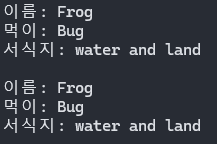
둘 중 어떤 함수를 호출하든 같은 값을 출력하는 것을 확인할 수 있다.

근데 다운캐스트는 그냥 냅다 바꿀 수 없다.
다운캐스팅은 앞서 말했듯 형변환 같은 건데, 구조가 다르면 어떻게 될까?
자료형을 변환할 때를 생각하면 쉽다.
문자열을 정수 타입에 넣으려고 하면 어떻게 되는가?
런타임 오류 / 컴파일 오류가 발생한다.
부모 - 자식간의 다운캐스트는 기본 구조가 동일하기 때문에 자연스럽게 이루어진다.
하지만 자식 - 자식 간이나 다른 구조의 두 클래스를 다운캐스트를 하려고 하면 문제가 된다.
이러한 문제를 사전에 예방하기 위한 방법이 두 가지 있다.
- is / as 키워드
사전에 클래스의 정체를 파악하는 데 도움이 되는 친구들이다. 사용 방법을 알아보자.
// is - 안전 캐스팅 (객체가 특정 타입인지 확인)

Character character = new Warrior();
if (character is Warrior)
{
    Warrior warrior = (Warrior)character;
}
is는 객체의 타입을 판별해 주는 키워드이다.
정확히는 메모리 어디를 참조하고 있는지를 확인한다.
== 와 달리 정확히 동일한 경우만 true를 뱉는 것이 아니라
is "A클래스"인 경우, A클래스의 메모리 참조 확인이 가능한 A클래스의 자식관계(하위분류)의 경우 모두 true를 뱉는다.
그러니까 니가 A클래스에 접근할 수 있는 놈이니? 묻는 것
근데 A의 자식관계인 친구들이 A클래스로 타입 변환하는 건 업캐스팅이다.
그러니까 저게 가능하려면 한 번 업캐스팅을 거치고, 다시 복귀하는 경우에 사용한다.
// as - 안전 캐스팅 (실패 시 예외를 던지지 않고 null을 반환)

Warrior warrior = character as Warrior;

if(warrior != null)
{
    warrior.Rander();
}
as는 일단 타입 변환을 시켜보고, 안된다 싶으면(null인 경우) 그냥 포기하는 문이다.
위 예시에서는 character을 warrior로 형변환 시켜보고, 만약 null이 아닌 경우 정상 출력해보라고 시키고 있다.
왜 이짓을 하는가?
우리는 배열을 쓸 때 타입이 같지 않으면 한 배열에 묶지 못한다는 사실을 알고 있다.
하지만 소속 클래스대로 타입을 지정하게 되면 타입이 준구난방이 돼서 한 배열에 넣지 못할 것이다.
그럴 때 가장 상위 분류(부모)로 타입을 지정한 뒤, 메모리만 정확히 지정해 주면 한 배열에 객체를 몰아넣을 수 있다. (타입이 같기 때문에)
이게 업캐스팅이다.
문제라면 타입이 부모인 경우, 하위 분류에 소속된 멤버에는 접근이 불가능하다.
필요에 따라 잠깐 다운캐스트를 하여 하위 분류 멤버에 접근 후 해체하는 것이다.
이때 is문이나 as문을 통해 원래 소속을 정확히 확인하여 안전하게 다운캐스트를 하는 것이다. (런타임 오류 방지 ㅠㅠ)
그러니까 타입 통일해서 한 배열로 관리해먹다가
필요 시 검토 후 다시 형변환하는 거임
아이고 어렵다
오늘의 미션 하단을 is문을 통해 구현해 보았다.
Animals Frog = new aquaticAnimals("Frog", "Bug");

if(Frog is aquaticAnimals)
{
    aquaticAnimals frog = (aquaticAnimals)Frog;
    frog.habitat = "water and land";
    frog.Info();
    Frog.Info();
}
Frog는 딱 봐도 수생동물 메모리를 참조하는 것이 보인다.
그래서 순조롭게 is문을 통과하여 다운캐스트 후 값을 변경한 것을 확인할 수 있다.
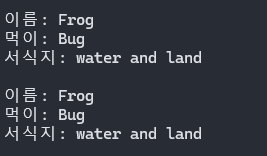
또 다른 예제가 있는데 그냥 참고만 하자.
using System;
using System.Collections.Generic;
using System.Linq;
using System.Security.Cryptography;
using System.Text;
using System.Threading.Tasks;

namespace _20260114_Mission
{
    // 부모 - 제품, 자식 - 유제품 / 육류, 손자 - 치즈 원유 / 돼지고기 닭고기

    public class Product
    {
        public string name;
        public double price;

        public double DC;

        public Product(string name, int price)
        {
            this.name = name;
            this.price = price;
        }

        public virtual void Info()
        {
            Console.WriteLine();
            Console.WriteLine($"제품 이름: {name}");
            Console.WriteLine($"제품 가격: {price}");
        }
    }

    // 유제품

    public class DairyProduct   : Product
    {
        public string sth_1;

        public DairyProduct(string name, int price) : base(name, price)
        {
            sth_1 = "Dairy";
            DC = 0.5;
        }
        public override void Info()
        {
            base.Info();
            Console.WriteLine($"상위 분류: {sth_1}");
            Console.WriteLine($"할인가: {price * DC}");
        }
    }
    public class Cheese : DairyProduct
    {
        public string sth_2;
        public Cheese(string name, int price) : base(name, price)
        {
            sth_2 = "Cheese";
        }
        public override void Info()
        {
            base.Info();
            Console.WriteLine($"하위 분류: {sth_2}");
        }
    }
    public class Milk : DairyProduct
    {
        public string sth_2;
        public Milk(string name, int price) : base(name, price)
        {
            sth_2 = "Milk";
        }
        public override void Info()
        {
            base.Info();
            Console.WriteLine($"하위 분류: {sth_2}");
        }
    }


    // 육류

    public class MeetProduct : Product
    {
        public string sth_1;

        public MeetProduct(string name, int price) : base(name, price)
        {
            sth_1 = "Meet";
            DC = 1.0;
        }
        public override void Info()
        {
            base.Info();
            Console.WriteLine($"상위 분류: {sth_1}");
            Console.WriteLine($"할인가: {price * DC}");
        }
    }

    public class Pork : MeetProduct
    {
        public string sth_2;

        public Pork(string name, int price) : base(name, price)
        {
            sth_2 = "Pork";
            DC = 0.9;
        }
        public override void Info()
        {
            base.Info();
            Console.WriteLine($"하위 분류: {sth_2}");
        }
    }
    public class Chicken : MeetProduct
    {
        public string sth_2;

        public Chicken(string name, int price) : base(name, price)
        {
            sth_2 = "Chicken";
            DC = 0.7;
        }
        public override void Info()
        {
            base.Info();
            Console.WriteLine($"하위 분류: {sth_2}");
        }
    }


    internal class Mission_2
    {
        static void Main(string[] args)
        {
            Product kkiri = new Cheese("끼리 치즈", 3900);
            Product GoodMilk = new Milk("굿밀크", 2000);
            kkiri.Info();
            GoodMilk.Info();

            Product ChickenWing = new Chicken("닭날개", 990);
            Product Bacon = new Pork("베이컨", 5000);
            ChickenWing.Info();
            Bacon.Info();
        }
    }
}
===========================================================
슈팅게임을 만들 수 있게 되었다 !
상속의 개념을 조금 알게 되었다 !


