김산나
[멋쟁이사자처럼부트캠프 유니티 게임 개발 7기] 2026년 1월 19일 회고록 - 콘솔 게임 시연회 개발 일지 본문
확실히 간단한 내용을 따라 쓰고, 짧은 문제를 푸는 것보다 전체 시스템을 짜는 게 공부에 도움이 많이 됐다.
내가 알고 있다고 착각하고 있던 개념 (가령 Class) 리뷰에 큰 도움이 됐다.
1. 기획
일단 기획을 했다.
뭘 해볼까 고민하다 도박게임을 만들자 생각이 들어 기획에 들어갔다.
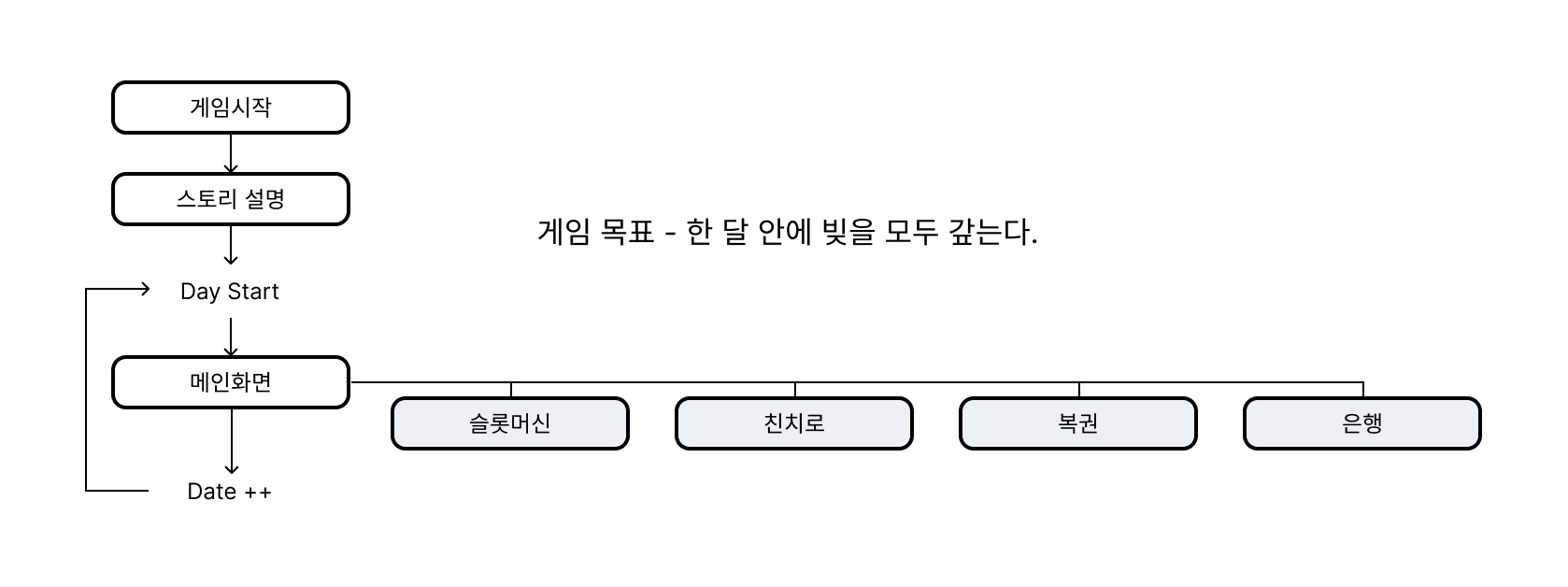

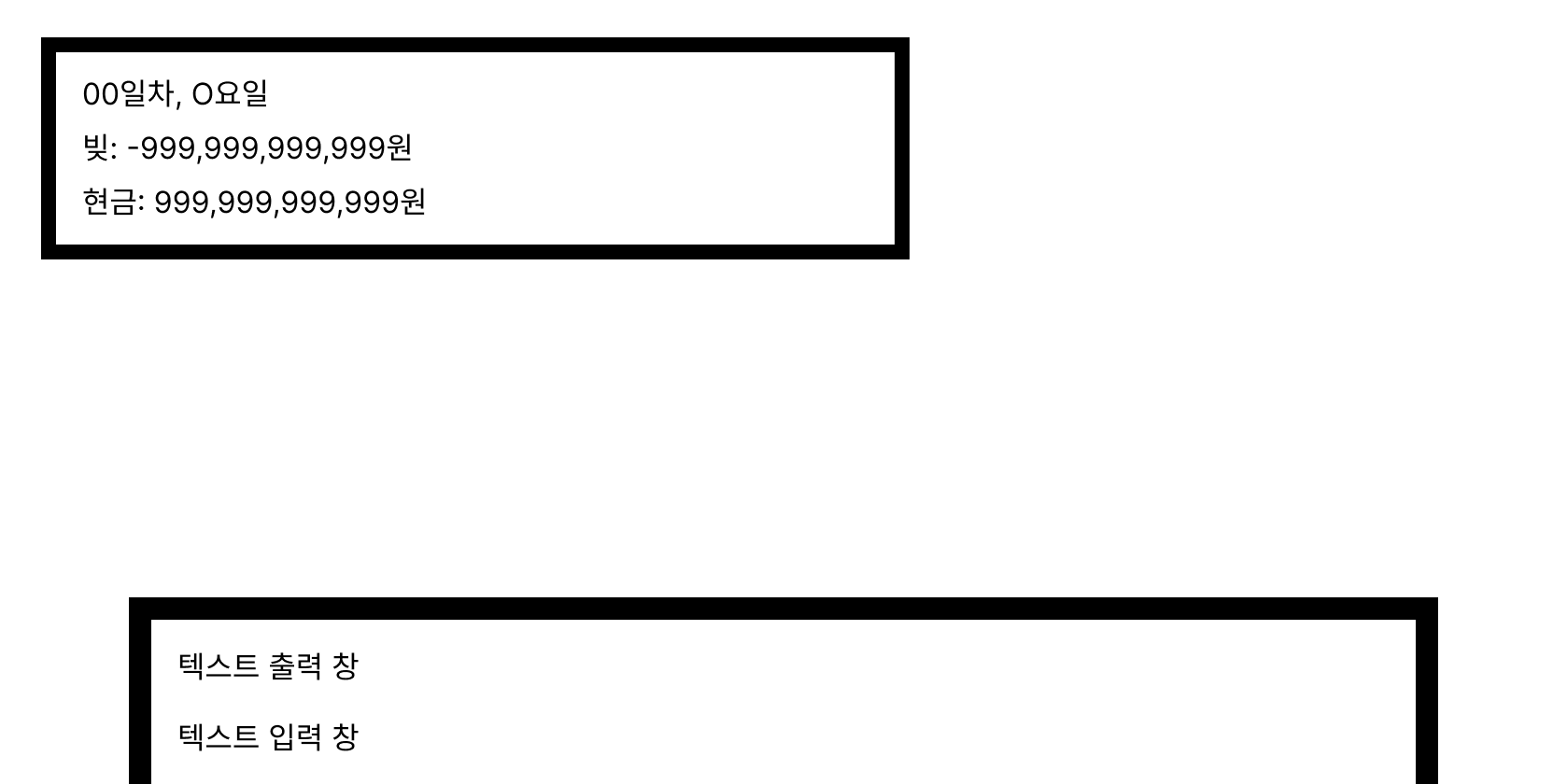
목표는 거창한 무언가를 만들기보다 "일단 C#공부를 좀 딥하게 해보자"였기 때문에 그래픽은 간단히 포기
2. 밸런스
간단한 시스템 기획 후
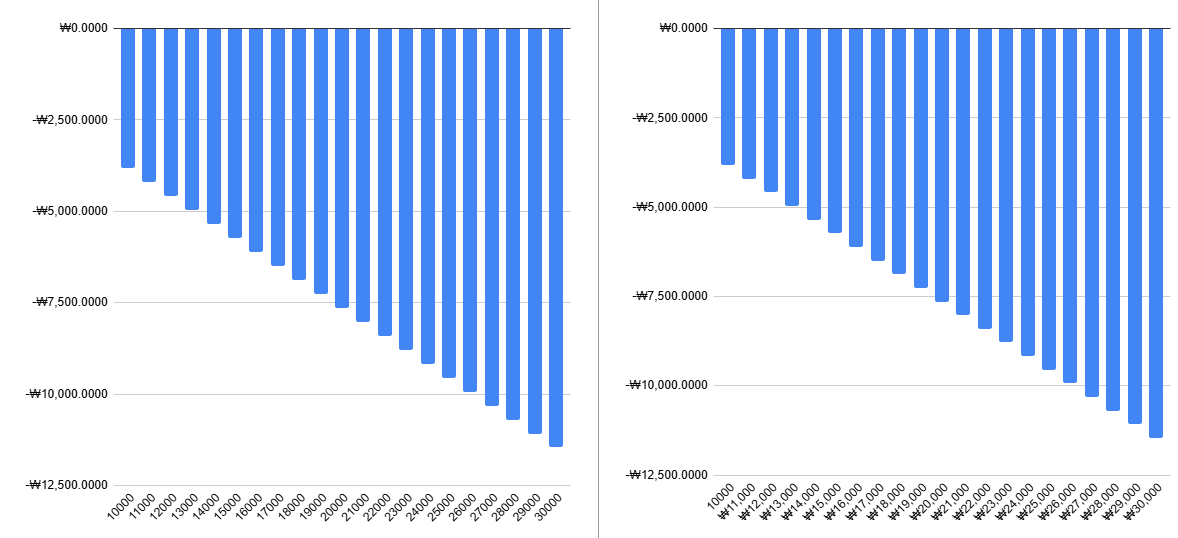
https://docs.google.com/spreadsheets/d/1rDFg7Miyj9c23BEyD-DBieDep7RG0ldv3gwD3n06hyU/edit?usp=sharing
각 게임당 기대수익을 간단하게 스프레드시트로 계산하였다. (대충 망겜이라는 뜻)
3. 코딩
이후 어떤 클래스가 필요할지 생각해 보았다.
| Main(Program) | 메인. 실제로 게임이 돌아가는 공간. |
| GameInfo | 각종 플레이어 정보를 전담하는 클래스 |
| UI | 게임 내 UI를 계산 및 그려주는 메서드가 쌓여있는 클래스 |
| Script | 게임 분기, 진행 전담. 실제 출력되는 스크립트를 담고 있다. |
| Chinchiro | 친치로 게임 로직 전담 |
| SlotMachine | 슬롯머신 게임 로직 전담 |
| Lottery | 복권 로직 전담 |
원래는 MainGame 클래스가 따로 있었는데, 뭔가 길이가 애매해져서 그냥 프로그램에 합쳤다.
최대한 AI를 사용하지 말고 개발을 해보자는 각오로 개발을 시작했다.
- UI 클래스
1. SectionOption
사실 UI클래스만 있는 게 아니라, 상속을 활용해보고자 사이즈 정보를 담고 있는 부모 - 자식 관계의 클래스를 추가로 설정했다.
public class SectionOption
{
    public int X { get; set; }
    public int Y { get; set; }
    public int Width { get; set; }
    public int Height { get; set; }
}
X, Y는 그리는 시작점, Width, Height는 사이즈이다. 박스 및 출력범위 청사진이 될 녀석.
2. BoxOption
public class BoxOption : SectionOption
{
    public string[] Corner { get; set; }
    // 0 좌상, 1 우상, 2 좌하, 3 우하, 4 가로선, 5 세로선
}
박스를 그릴 녀석들은 모서리의 정보도 넣어줄 수 있도록 자식 클래스를 하나 더 만들어 주었다.
3. UI - 필드
본격적인 UI 클래스.
public class UI
{
    public int Buffwidth;
    public int Buffheight;
    public BoxOption GameBox;
    public BoxOption TextBox;
    public BoxOption StatusBox;
필드는 다음과 같다. 버퍼 전체 사이즈를 담은 정수형 변수,
이어 게임 전체 박스를 그려줄 클래스 , 텍스트 박스를 그려줄 클래스 , 스텟박스를 그려줄 클래스를 선언하였다.
4. UI - ScreenSection
public void ScreenSetting(int width, int height)
{
    // 설정하고자 하는 사이즈
    Console.SetWindowSize(width, height);
    Console.SetBufferSize(width, height);
    //Console.CursorVisible = false;
}
메인 메서드에서 지정해줄 수 있도록 매개변수를 설정해 주었다. 화면 사이즈 설정.
5. UI - DrawBox
public void DrawBox(BoxOption option)
{
    // Y값 계산
    for (int currY = option.Y; currY < option.Y + option.Height; currY++)
    {
        // X값 계산
        for (int currX = option.X; currX < option.X + option.Width; currX++)
        {
            // 콘솔 범위를 벗어나지 않도록 안전장치 (컴파일 오류 방지)
            if (currX < 0 || currY < 0 || currX >= Console.BufferWidth || currY >= Console.BufferHeight) continue;

            Console.SetCursorPosition(currX, currY);

            // 1. 모서리 그리기
            if (currX == option.X && currY == option.Y)
                Console.Write(option.Corner[0]); // 좌상
            else if (currX == option.X + option.Width - 1 && currY == option.Y)
                Console.Write(option.Corner[1]); // 우상
            else if (currX == option.X && currY == option.Y + option.Height - 1)
                Console.Write(option.Corner[2]); // 좌하
            else if (currX == option.X + option.Width - 1 && currY == option.Y + option.Height - 1)
                Console.Write(option.Corner[3]); // 우하

            // 2. 테두리 그리기
            else if (currY == option.Y || currY == option.Y + option.Height - 1)
                Console.Write(option.Corner[4]); // 가로선
            else if (currX == option.X || currX == option.X + option.Width - 1)
                Console.Write(option.Corner[5]); // 세로선
        }
    }
}
박스를 실제로 그려주는 메서드.
박스 옵션 타입으로 값을 받고, 그 값에 맞게 박스를 그려준다.
사실 여기서 1차 위기가 왔었다. if문 처리를 잘못하면 첫 줄 아래로 쭉 인식을 못한다.
원인은 or과 and를 헷갈려서였다. 쓸데없는 것으로 거의 몇 시간을 날린 듯...
아무튼 이 메서드는 박스를 그려주는 메서드에서 소환하는 친구이다.
나중에는 차라리 DrawBox 메서드를 실행시키고, 그릴 대상의 매개변수를 넣어주는 게 모양이 더 예쁠까? 싶기도 해서
고려해 봐야겠다.
6. UI - GameBoxRenderer
// 전체 게임 화면 박스를 그려주는 랜더러
public void GameBoxRenderer()
{
    GameBox = new BoxOption
    {
        X = 0,
        Y = 0,
        Width = Buffwidth,
        Height = Buffheight,

        Corner = new string[] { "┌", "┐", "└", "┘", "─", "│" }
    };

    DrawBox(GameBox);

    // 커서 위치 초기화
    Console.SetCursorPosition(0, Buffheight - 1);
}
이렇게 객체를 생성한 뒤, DrawBox메서드에 넣어준다.
커서 위치 초기화는 게임 종료 시 예쁘게 뜨라고 세팅해준 건데, 지금와서 보니까 삭제해야 할 것 같다...
(저기서 끝나면 버퍼 사이즈 초과로 오류뜸 ㅋㅋㅋㅋㅋㅋㅋ)
7. UI - TextBoxRenderer
// 텍스트 박스를 그려주는 렌더러
public void TextBoxRenderer()
{
    TextBox = new BoxOption
    {
        X = 5,
        Y = 16,
        Width = Buffwidth - 10,
        Height = Buffheight - 17,

        Corner = new string[] { "┏", "┓", "┗", "┛", "━", "┃" }
    };
    DrawBox(TextBox);

    // 커서 위치 초기화
    Console.SetCursorPosition(0, Buffheight - 1);

}
위랑 동일.
8. UI - StatusBoxRenderer
// 현재 상태 박스를 그려주는 렌더러
public void StatusBoxRenderer()
{
    StatusBox = new BoxOption
    {
        X = 5,
        Y = 1,
        Width = Buffwidth - 36,
        Height = Buffheight - 20,

        Corner = new string[] { "┏", "┓", "┗", "┛", "━", "┃" }
    };
    DrawBox(StatusBox);

    // 커서 위치 초기화
    Console.SetCursorPosition(0, Buffheight - 1);
}
위랑 동일.
9. UI - ClearTextBox
public void ClearTextBox()
{
    int innerX = TextBox.X + 1;
    int innerY = TextBox.Y + 1;
    int maxWidth = TextBox.Width - 2;
    int maxHeight = TextBox.Height - 2;

    for (int i = 0; i < maxHeight; i++)
    {
        Console.SetCursorPosition(innerX, innerY + i);
        // 박스 가로 폭만큼 공백(' ')을 채워 넣음
        Console.Write(new string(' ', maxWidth));
    }
}
박스 내부를 초기화 해주는 메서드. 텍스트 박스에서만 사용해서 저렇게 세팅을 해버렸는데, 나중에 재사용성을 높이기 위해 매개변수를 받아 하는 방식으로 변경해도 좋을 것 같다.
10. UI - TextRenderer
public void TextRenderer(string rawScripts)
{
    if (TextBox == null) return;

    int innerX = TextBox.X + 2;
    int innerY = TextBox.Y + 1;
    int maxWidth = TextBox.Width - 4;
    int maxHeight = TextBox.Height - 2;

    // 텍스트 박스 초기화
    ClearTextBox();

    int currentLine = 0;
    int currentVisualWidth = 0;
    int cursorX = innerX; // 글자가 출력될 현재 X 위치 추적

    Console.CursorVisible = true;

    foreach (char c in rawScripts)
    {
        // 줄바꿈 인식
        if (c == '\n')
        {
            currentLine++;
            currentVisualWidth = 0;
            cursorX = innerX;

            if (currentLine >= maxHeight) break;
            continue;
        }

        // 현재 글자의 너비 판별 (한글 2칸, 나머지 1칸)
        int charWidth = (c >= '\uAC00' && c <= '\uD7A3') ? 2 : 1;

        // 가로 폭을 넘으면 다음 줄로
        if (currentVisualWidth + charWidth > maxWidth)
        {
            currentLine++;
            currentVisualWidth = 0;
            cursorX = innerX;

            if (currentLine >= maxHeight) break;
        }

        // 커서 위치 이동 후 한 글자 출력
        Console.SetCursorPosition(cursorX, innerY + currentLine);
        Console.Write(c);

        // --- 이펙트의 핵심: 딜레이 추가 ---
        // 15~30ms 정도가 가장 적당하며, 공백(' ')일 때는 더 빠르게 넘어가도록 조절 가능합니다.
        Thread.Sleep(25);

        // 다음 글자 위치 계산
        cursorX += charWidth;
        currentVisualWidth += charWidth;
    }
}
UI 클래스에서 가장 어려운 친구였다.
시원하게 박스 내부를 비우고, 1) \n을 확인해 줄바꿈, 2) 줄이 섹션을 넘어가면 줄바꿈해주는 로직으로 되어 있다.
대사가 짧아서 줄바꿈만 해줬는데, 나중에는 줄 개수도 넘어가면 다음 대사로 넘기는 로직도 넣어주면 좋지 않을까? 싶다.
가장 헷갈리던 건 문자별로 사이즈가 달라서 그거에 맞게 계산해야 했던 것.
짧은 딜레이를 주어 타자기 효과를 주었다.
11. UI - StatusRenderer
public void StatusRenderer(GameInfo gameinfo)
{
    if (StatusBox == null) return;

    // 스텟 섹션 그리기 시작점
    int innerX = StatusBox.X + 2; // 여유있게 마진 +2
    int innerY = StatusBox.Y + 1;

    // 스텟 섹션 그리기 넓이 높이
    int maxWidth = StatusBox.Width - 4; // 테두리 충돌 방지를 위해 좀 더 줄임
    int maxHeight = StatusBox.Height - 2;

    // 텍스트 박스 초기화
    ClearTextBox();

    Console.SetCursorPosition(innerX, innerY);
    Console.WriteLine($"{gameinfo.Day}일차, {gameinfo.Week}");
    Console.SetCursorPosition(innerX, innerY+1);
    Console.WriteLine($"현재 빚: {(double)gameinfo.Debt}");
    Console.SetCursorPosition(innerX, innerY+2);
    Console.WriteLine($"현재 보유금: {(double)gameinfo.Cash}");
}
좌측 상단에 표시할 스테이터스 내용을 표시해줄 렌더러 메서드이다.
- GameInfo 클래스
using System;
using System.Collections.Generic;
using System.Linq;
using System.Text;
using System.Threading.Tasks;

namespace ConsoleApp1
{
    public class GameInfo
    {
        public string CurrentScript;
        public double LastBet;  // 판돈

        public double Cash;   // 남은 현금
        public double Debt; // 빚 (5천만)

        public int Day;            // 현재 날짜
        public int WeekCounter;
        public string Week;

        public GameInfo()
        {
            CurrentScript = "DayStart";
            LastBet = 0;  // 판돈

            Cash = 100000f;   // 남은 현금
            Debt = -50000000f; // 빚 (5천만)


            Day = 1;            // 현재 날짜
            WeekCounter = 1;
            Week = "월요일";
        }


        // 친치로 필드
        // 친치로 결과
        public int[] chinchiroR = new int[3];


        // 복권 필드
        // 보유 복권 개수 - { 구매일차, 번호1, 번호2, 번호3, 번호4, 번호5 } X5
        public int[][] Lottery = new int[5][]
        {
            new int[] { 0, 0, 0, 0, 0, 0},
            new int[] { 0, 0, 0, 0, 0, 0},
            new int[] { 0, 0, 0, 0, 0, 0},
            new int[] { 0, 0, 0, 0, 0, 0},
            new int[] { 0, 0, 0, 0, 0, 0}
        };

        // 이번주 복권 번호
        public int[] lotteryResult = new int[] { 999, 0, 0, 0, 0, 0 };

        // 플레이어 복권 결과 - { 1등 개수, 2등 개수, 3등 개수, 꽝 개수 }
        public int[] playerLotteryResult = new int[] { 0, 0, 0, 0};

        // 복권 현재 장수 - -1이 아무 것도 없는 것
        public int lotteryCounter = -1;


        public void UpdateMoney(int result)
        {
            if (Cash + result < 0)
            {
                Cash = 0;
                Debt += Cash + result;
            }
            else
            {
                Cash += result;
            }
        }

        public void UpdateDate()
        {
            Day++;
            WeekCounter = Day % 7;
            WeekChecker();
        }

        public void WeekChecker()
        {
            if (WeekCounter == 0)
            {
                Week = "일요일";
            }
            else if (WeekCounter == 1)
            {
                Week = "월요일";
            }
            else if (WeekCounter == 2)
            {
                Week = "화요일";
            }
            else if (WeekCounter == 3)
            {
                Week = "수요일";
            }
            else if (WeekCounter == 4)
            {
                Week = "목요일";
            }
            else if (WeekCounter == 5)
            {
                Week = "금요일";
            }
            else if (WeekCounter == 6)
            {
                Week = "토요일";
            }
            else
            {
                Week = "잘못된 값입니다.";
            }
        }


    }
}
게임 데이터.
유저 데이터 + 게임 진행에 필요한 각종 데이터를 담아두었다.
어차피 싱글게임이고 내용이 많지 않아 싹 한 다라이에 담았다.
- Chinchiro Class
1. Chinchiro Class 필드
public class Chinchiro
{
    GameInfo gameinfo;

    int[] Dice = new int[3];
    Random rnd = new Random();

    string[,] DiceBox ={
            // 주사위 1
            {
                "██████████████",
                "██████████████",
                "████      ████",
                "████      ████",
                "████      ████",
                "██████████████",
                "██████████████"
            },
            // 주사위 2
            {
                "██████████████",
                "█████    █████",
                "█████    █████",
                "██████████████",
                "█████    █████",
                "█████    █████",
                "██████████████"
            },
            // 주사위 3
            {
                "██████████████",
                "██████████  ██",
                "██████████████",
                "██████  ██████",
                "██████████████",
                "██  ██████████",
                "██████████████"
            },
            // 주사위 4
            {
                "██████████████",
                "██  ██████  ██",
                "██████████████",
                "██████████████",
                "██████████████",
                "██  ██████  ██",
                "██████████████"
            },
            // 주사위 5
            {
                "██████████████",
                "██  ██████  ██",
                "██████████████",
                "██████  ██████",
                "██████████████",
                "██  ██████  ██",
                "██████████████"
            },
            // 주사위 6
            {
                "██████████████",
                "██  ██████  ██",
                "██████████████",
                "██  ██████  ██",
                "██████████████",
                "██  ██████  ██",
                "██████████████"
            }
        };
친치로에 관련된 룰이다.
주사위 객체, 결과를 랜덤으로 뽑아줄 랜덤 객체와 주사위 그래픽이다.
2. ChinchiroInfoSet, ChinchiroDice
public void ChinchiroInfoSet(GameInfo gameinfo)
{
    this.gameinfo = gameinfo;
}

public int[] ChinchiroDice()
{
    for (int i = 0; i < 3; i++)
    {
        Dice[i] = rnd.Next(1, 7);
    }
    Array.Sort(Dice);
    return Dice;
}
전자는 메인 메서드의 게임 데이터 객체 정보를 받아오는 메서드이다.
후자는 주사위 굴리기.
3. ChinchiroRenderer
public void ChinchiroRenderer(BoxOption GameBox, BoxOption StatusBox)
{
    if (StatusBox == null || GameBox == null || gameinfo.chinchiroR == null) return;

    // 스테이터스 박스 높이 파악, 다이스 섹션 시작점 파악
    int InnerX = StatusBox.X;           // 왼쪽 여백이자 D1그리기 시작점x좌표
    int InnerY = StatusBox.Height + 2;

    // 섹션 폭 확인
    int InnerWidth = GameBox.Width - (2* StatusBox.X);

    // 다이스 사이즈 파악
    int diceCount = gameinfo.chinchiroR.GetLength(0);   // 다이스 개수 (3)
    int diceHeight = DiceBox.GetLength(1);  // 세로 (7)
    int diceWidth = DiceBox[0, 0].Length;   // 가로 (14)

    // 다이스 간격
    int m = (InnerWidth - (diceWidth * diceCount)) / (diceCount + 1);

    // 다이스 섹션 초기화
    for (int i = 0; i < diceHeight; i++)
    {
        Console.SetCursorPosition(InnerX, InnerY + i);
        if(InnerWidth > 0) Console.Write(new string(' ', InnerWidth));
    }

    // 다이스 3개
    for (int dice = 0; dice < diceCount; dice ++)
    {
        // 시작점 추적
        int posX = InnerX + (m * (dice+1)) + (diceWidth * dice);

        // 다이스 그리기 시작
        for (int i = 0; i < diceHeight; i++)
        {
            Console.SetCursorPosition(posX, InnerY + i);
            Console.Write(DiceBox[gameinfo.chinchiroR[dice]-1, i]);
        }
    }

}
주사위 그래픽 섹션을 담당하는 메서드이다.
상단 상태창에 맞춰서 아래에 중앙정렬로 배치하였다.
결과에 맞게 띄운다.
4. ChinchiroYakuCheck
public void ChinchiroYakuCheck(int chip, GameInfo _gameinfo, out string Yaku, out double result)
{
    _gameinfo.Cash -= gameinfo.LastBet;

    Yaku = "FAIL";
    result = 0;

    if (gameinfo.chinchiroR[0] == 1 && gameinfo.chinchiroR[1] == 1 && gameinfo.chinchiroR[2] == 1)
    {
        Yaku = "FINJORO";
        result = chip * 50;

    }
    else if (gameinfo.chinchiroR[0] == gameinfo.chinchiroR[1] && gameinfo.chinchiroR[0] == gameinfo.chinchiroR[2])
    {
        Yaku = "ARASHI";
        result = chip * 10 * gameinfo.chinchiroR[0];
    }
    else if (gameinfo.chinchiroR[0] == 4 && gameinfo.chinchiroR[1] == 5 && gameinfo.chinchiroR[2] == 6)
    {
        Yaku = "SHIGORO";
        result = chip * 5;
    }
    else if ((gameinfo.chinchiroR[0] == gameinfo.chinchiroR[1]) || (gameinfo.chinchiroR[1] == gameinfo.chinchiroR[2]) || (gameinfo.chinchiroR[2] == gameinfo.chinchiroR[0]))
    {
        Yaku = "NORMAL";
        if ((gameinfo.chinchiroR[0] == gameinfo.chinchiroR[1]) || (gameinfo.chinchiroR[0] == gameinfo.chinchiroR[2]))
        {
            result = chip + chip * gameinfo.chinchiroR[0] * -0.5;
        }
        else
        {
            result = chip + chip* gameinfo.chinchiroR[1] * -0.5;
        }
    }
    else
    {
        result = chip * -5;

        Yaku = "FAIL";
    }

    // 결과 정산
    result = Math.Truncate(result);
    _gameinfo.Cash += result;

    // 음수처리
    if (_gameinfo.Cash <0)
    {
        _gameinfo.Debt += _gameinfo.Cash;
        _gameinfo.Cash = 0;
    }

    // 자릿수 정리
    _gameinfo.Cash = Math.Truncate(_gameinfo.Cash);
    _gameinfo.Debt = Math.Truncate(_gameinfo.Debt);

}
결과값에 따라 돈을 정산하는 로직이다.
...여기서 마지막 자릿수 정리가 대박 중요한데, 뒤에서 나오는 개찐빠로 시연 때 버그가 터진다.
- SlotMachine
1. SlotMachine 필드
public class SlotMachine
{
    GameInfo gameinfo;

    // 슬롯 결과 (3개의 숫자)
    int[] Slots = new int[3];
    Random rnd = new Random();

    // 슬롯 이미지 (숫자 1~7) - 14x7 사이즈
    string[,] SlotIcons = {
        // 1
        {
            "              ",
            "      ██      ",
            "    ████      ",
            "      ██      ",
            "      ██      ",
            "    ██████    ",
            "              "
        },
        // 2
        {
            "              ",
            "    ██████    ",
            "        ██    ",
            "    ██████    ",
            "    ██        ",
            "    ██████    ",
            "              "
        },
        // 3
        {
            "              ",
            "    ██████    ",
            "        ██    ",
            "    ██████    ",
            "        ██    ",
            "    ██████    ",
            "              "
        },
        // 4
        {
            "              ",
            "    ██  ██    ",
            "    ██  ██    ",
            "    ██████    ",
            "        ██    ",
            "        ██    ",
            "              "
        },
        // 5
        {
            "              ",
            "    ██████    ",
            "    ██        ",
            "    ██████    ",
            "        ██    ",
            "    ██████    ",
            "              "
        },
        // 6
        {
            "              ",
            "    ██████    ",
            "    ██        ",
            "    ██████    ",
            "    ██  ██    ",
            "    ██████    ",
            "              "
        },
        // 7
        {
            "              ",
            "    ██████    ",
            "    ██  ██    ",
            "        ██    ",
            "       ██     ",
            "      ██      ",
            "              "
        }
    };
사실상 친치로 슬롯버전이다. 차이가 있다면 망배수가 7까지 뜬다.
슬롯머신의 필드는 친치로와 동일하게 결과, 랜덤 객체, 그래픽이 담겨있다.
2. SlotSpinAnimation
public void SlotSpinAnimation(BoxOption GameBox, BoxOption StatusBox)
{
    int spinCount = 15; // 애니메이션 프레임 수
    int delay = 50;     // 프레임 간격 (ms)

    for (int frame = 0; frame < spinCount; frame++)
    {
        // 임시로 랜덤한 숫자를 생성해 렌더링
        for (int i = 0; i < 3; i++)
        {
            Slots[i] = rnd.Next(1, 8);
        }

        // 렌더링 함수 호출
        SlotRenderer(GameBox, StatusBox);

        // 속도가 점점 느려지는 효과
        Thread.Sleep(delay + (frame * 10));
    }
}
슬롯머신 애니메이션을 구현하는 함수. Thread.Sleep를 사용하였다.
3. SlotInfoSet, SlotRenderer
public void SlotInfoSet(GameInfo gameinfo)
{
    this.gameinfo = gameinfo;
}

// 슬롯 돌리기 (1~7 랜덤)
public int[] SlotSpin()
{
    for (int i = 0; i < 3; i++)
    {
        Slots[i] = rnd.Next(1, 8); // 1~7
    }
    return Slots;
}
게임 데이터를 받아오는 메서드, 그리고 결과뽑기를 하는 메서드이다.
4. SlotRenderer
public void SlotRenderer(BoxOption GameBox, BoxOption StatusBox)
{
    if (StatusBox == null || GameBox == null || Slots == null) return;

    int InnerX = StatusBox.X;
    int InnerY = StatusBox.Height + 2;
    int InnerWidth = GameBox.Width - (2 * StatusBox.X);

    int slotCount = 3;
    int iconHeight = SlotIcons.GetLength(1); // 7
    int iconWidth = SlotIcons[0, 0].Length;  // 14

    // 간격 계산
    int m = (InnerWidth - (iconWidth * slotCount)) / (slotCount + 1);

    // 영역 초기화
    for (int i = 0; i < iconHeight; i++)
    {
        Console.SetCursorPosition(InnerX, InnerY + i);
        if (InnerWidth > 0) Console.Write(new string(' ', InnerWidth));
    }

    // 슬롯 3개 그리기
    for (int s = 0; s < slotCount; s++)
    {
        int posX = InnerX + (m * (s + 1)) + (iconWidth * s);
        int numIndex = Slots[s] - 1; // 0~6 인덱스로 변환

        for (int i = 0; i < iconHeight; i++)
        {
            Console.SetCursorPosition(posX, InnerY + i);
            Console.Write(SlotIcons[numIndex, i]);
        }
    }
}
슬롯머신을 그리는 메서드. 자세히 보면 슬롯머신 애니메이션 메서드 내부에서 동작하는 것을 볼 수 있다.
5.SlotCheck
// 결과 체크 및 정산
public void SlotCheck(int chip, GameInfo _gameinfo, out string ResultKey, out double result)
{
    // 베팅 금액 선차감
    _gameinfo.Cash -= gameinfo.LastBet;

    ResultKey = "FAIL";
    result = 0;

    int s1 = Slots[0];
    int s2 = Slots[1];
    int s3 = Slots[2];

    // 1. 잭팟 (777)
    if (s1 == 7 && s2 == 7 && s3 == 7)
    {
        ResultKey = "JACKPOT";
        result = chip * 100;
    }
    // 2. 트리플 (세 칸 같음) -> 3배 * 숫자
    else if (s1 == s2 && s2 == s3)
    {
        ResultKey = "TRIPLE";
        result = chip * 3 * s1;
    }
    // 3. 더블 (두 칸 같음) -> 2배 * 숫자
    else if (s1 == s2 || s2 == s3 || s1 == s3)
    {
        ResultKey = "DOUBLE";
        int pairNum = (s1 == s2) ? s1 : (s2 == s3 ? s2 : s1);
        result = chip * 2 * pairNum;
    }
    // 4. 꽝 (모두 다름) -> 가장 큰 숫자 * -1 만큼 잃음 (추가 손실)
    else
    {
        ResultKey = "FAIL";
        int maxNum = Math.Max(s1, Math.Max(s2, s3));

        // 규칙: 슬롯 중 가장 큰 슬롯 번호 * -1
        // 베팅금은 이미 차감되었고, 추가로 (베팅금 * MaxNum)만큼 빚이 늘어나거나 현금이 깎여야 함
        // 여기서는 결과값(result)을 음수로 반환하여 Cash에 더하게 처리
        result = chip * maxNum * -1;
    }

    // 결과 반영
    result = Math.Truncate(result);
    _gameinfo.Cash += result;

    // 현금이 마이너스가 되면 빚으로 전환
    if (_gameinfo.Cash < 0)
    {
        _gameinfo.Debt += _gameinfo.Cash;
        _gameinfo.Cash = 0;
    }

    // 소수점 정리
    _gameinfo.Cash = Math.Truncate(_gameinfo.Cash);
    _gameinfo.Debt = Math.Truncate(_gameinfo.Debt);
}
슬롯머신 결과 정산하는 메서드.
- Lottery Class
1. Lottery 필드, Lottery
public class Lottery
{
    GameInfo gameinfo;
    Random rand = new Random();
    int expiryDate = 7;
    int lotteryCost = 1000;
    public string canLotteryBuy = "";

    public Lottery(GameInfo receivedInfo)
    {
        gameinfo = receivedInfo;
    }
게임데이터 클래스 선언, 랜덤 객체, 복권 유효기간과 가격, 로터리 상태를 표시하는 변수이다.
하단에는 게임 데이터를 받아오는 메서드이다.
2. LotteryNumPicker
// 복권 결과 추첨
public void LotteryNumPicker()
{
    // 토요일이고 아직 추첨 안 했을 때만 실행
    if (gameinfo.Week == "토요일")
    {
        for (int i = 1; i < gameinfo.lotteryResult.Length; i++)
        {
            int nextNum = rand.Next(1, 51);

            // Contains를 쓸 때 범위를 명확히 지정하거나 List 활용
            if (gameinfo.lotteryResult.Take(i).Contains(nextNum))
            {
                i--;
                continue;
            }
            gameinfo.lotteryResult[i] = nextNum;
        }
        Array.Sort(gameinfo.lotteryResult, 1, 5);
    }
}
하루가 넘어갈 때마다 일자 업데이트 메서드 다음에 작동하는 메서드. 토요일인지 확인 후 토요일에만 작동한다.
번호를 뽑아 저장한다. 중복 불가.
3. LotteryResult
// 플레이어 복권 비교 및 결과
public void LotteryResult()
{
    // 매주 토요일마다 결과 처리
    if (gameinfo.Week == "토요일")
    {
        // 복권 슬롯 정리
        if (gameinfo.Cash < lotteryCost)
        {
            canLotteryBuy = "LESSMONEY";
        }
        else
        {
            // 날짜 체크
            for (int checker = 0; checker < gameinfo.Lottery.Length; checker++)
            {
                // 유효기간이 지났다면
                if (gameinfo.Lottery[checker][0] + expiryDate <= gameinfo.Day)
                {
                    // 해당 복권 리셋(삭제)
                    Array.Clear(gameinfo.Lottery[checker], 0, gameinfo.Lottery[checker].Length);
                }
            }
            // 복권 재배열. 날짜순으로 배열한다. 일차 칸이 0(리셋된 애들)은 맨 뒤로
            Array.Sort(gameinfo.Lottery, (a, b) => b[0].CompareTo(a[0]));

            // 유효 장수 카운트
            for (int i = 0; i < gameinfo.Lottery.Length; i++)
            {
                if (gameinfo.Lottery[i][0] != 0) gameinfo.lotteryCounter = i;
            }

            // 1등 개수, 2등 개수, 3등 개수, 꽝 개수
            gameinfo.playerLotteryResult = new int[] { 0, 0, 0, 0 };

            // 5장 모두 확인
            for (int i = 0; i < gameinfo.Lottery.Length; i++)
            {
                // ★ 추가: 구매 일자(인덱스 0)가 0이라면 구매하지 않은 슬롯이므로 계산 안 함
                if (gameinfo.Lottery[i][0] == 0) continue;

                int matchCount = gameinfo.lotteryResult.Skip(1).Intersect(gameinfo.Lottery[i].Skip(1)).Count();

                if (matchCount == 5) gameinfo.playerLotteryResult[0]++;
                else if (matchCount == 4) gameinfo.playerLotteryResult[1]++;
                else if (matchCount == 3) gameinfo.playerLotteryResult[2]++;
                else gameinfo.playerLotteryResult[3]++; // 이제 실제 구매한 복권 중 틀린 것만 '꽝'이 됩니다.

            }
        }
    }
    else
    {
        return;
    }
}
개인적으로 가장 어지러웠던 메서드.
약간의 실수만으로도 버그가 터져 번호를 인식을 못하거나, 장수 카운트를 못하거나 별 말도 안되는 일이 일어났다.
자연어로 기획을 자세히 한 뒤에 제작할 걸 그랬다... 중간에 까먹어서 날리는 바람에 버그가 난 경우도 있었다.
4. LotteryResultGet
public void LotteryResultGet()
{
    double winCash = (double)gameinfo.playerLotteryResult[0] * 100000000 +
           (double)gameinfo.playerLotteryResult[1] * 2000000 +
           (double)gameinfo.playerLotteryResult[2] * 100000;

    gameinfo.Cash += winCash;

    for (int i = 0; i < gameinfo.Lottery.Length; i++)
    {
        Array.Clear(gameinfo.Lottery[i], 0, gameinfo.Lottery[i].Length);
    }
    gameinfo.lotteryCounter = -1; // 보유 장수 초기화
}
결과는 로터리 결과가 나온 시점에 세팅해두고, 돈 정산은 복권 결과 확인 시 하기로 했다.
까먹고 교환을 안 할 경우 유효기간이 지나면 돈을 못 받는 고증을 살림 ㄷㄷ
결과를 확인한 복권은 삭제한다.
5. LotteryBuy
// 복권 발급
public void LotteryBuy(string answer)
{
    // 공백으로 나누기
    string[] splitNumbers = answer.Split(new[] { ' ' }, StringSplitOptions.RemoveEmptyEntries);

    // 숫자가 5개인지 확인
    if (splitNumbers.Length != gameinfo.Lottery[0].Length - 1)
    {
        canLotteryBuy = "INPUTERROR";
        return;
    }

    List<int> inputNumbers = new List<int>();

    // 하나씩 변환해보기
    foreach (string s in splitNumbers)
    {
        if (int.TryParse(s.Trim(), out int result))
        {
            inputNumbers.Add(result);
        }
        else
        {
            // 문자가 섞여있어서 변환에 실패한 경우
            canLotteryBuy = "INPUTERROR";
            return;
        }
    }

    // 앞에 날짜를 추가하고 합치기
    int[] num = new[] { gameinfo.Day }.Concat(inputNumbers).ToArray();
    int targetIndex = gameinfo.lotteryCounter + 1;

    // 복권 구매
    if (gameinfo.lotteryCounter < 4)
    {
        canLotteryBuy = "SUCCESS";
        // 정렬을 통해 빈칸이 activeCounter 위치부터 시작됨
        for (int writer = 1; writer < num.Length; writer++)
        {
            // 멀쩡한 값인지 검사
            if (num[writer] > 50 || num[writer] <= 0)
            {
                // 50이상, 혹은 0 이하 혹은 중복자가 들어왔을 경우 InputError
                canLotteryBuy = "InputError";
                break;
            }
            // 중복값 검사 시 현재 위치 이전 값들만 검사 (0번 배열 제외)
            if (Array.IndexOf(num, num[writer], 1, writer - 1) != -1)
            {
                // 중복 있을 시 InputError
                canLotteryBuy = "InputError";
                break;
            }

            // 유효한 값이라면 복권 배열에 기록
            gameinfo.Lottery[targetIndex][writer] = num[writer];
        }

        // 만약 중간에 에러가 났다면 해당 행을 초기화
        if (canLotteryBuy == "InputError")
        {
            Array.Clear(gameinfo.Lottery[gameinfo.lotteryCounter], 0, gameinfo.Lottery[gameinfo.lotteryCounter].Length);
        }
        else
        {
            // 날짜 인덱스 추가
            gameinfo.Lottery[targetIndex][0] = num[0];
        }
    }
    else
    {
        canLotteryBuy = "OUTOFSTOCK";
    }

    // 구매 성공 확인 후 배열 정리 및 돈 차감
    if (canLotteryBuy == "SUCCESS")
    {
        gameinfo.lotteryCounter = targetIndex;
        Array.Sort(gameinfo.Lottery[gameinfo.lotteryCounter], 1, gameinfo.Lottery[gameinfo.lotteryCounter].Length - 1);
        gameinfo.Cash -= lotteryCost;
    }

    gameinfo.CurrentScript = "LotteryEnter";

}
복권 발급 메서드이다.
받은 숫자를 공백으로 나누어 숫자 배열에 저장하고, 조건에 맞는지 확인한다.
살 수 있는 장수가 넘지는 않았는지, 잘못 적지는 않았는지, 돈이 없지는 않은지 등 확인할 게 많아 약간 번거로웠다.
좀 더 섹시하게 모듈화시키면 조건이 추가되어도 쉽게 고칠 수 있지 않을까? 하는 생각이 들었지만... 시간이 부족쓰.
- Bank Class
1. Bank Repay, Loan
    public class Bank
    {
        public void Repay(string answer, GameInfo gameinfo)
        {
            if (double.TryParse(answer, out double temp)) // int 대신 double 권장
            {
                // 가진 돈보다 많이 갚으려고 하면, 현재 가진 돈만큼만 갚게 처리
                if (temp > gameinfo.Cash)
                {
                    temp = gameinfo.Cash;
                }

                gameinfo.Debt += temp;  // 빚 감소 (기존 로직상 Debt은 음수이므로 +)
                gameinfo.Cash -= temp;  // 현금 감소

                // 소수점 정리
                gameinfo.Debt = Math.Truncate(gameinfo.Debt);
                gameinfo.Cash = Math.Truncate(gameinfo.Cash);
            }
        }

        public void Loan(string answer, GameInfo gameinfo)
        {
            if (double.TryParse(answer, out double temp))
            {
                gameinfo.Cash += temp; // 현금 감소
                gameinfo.Debt -= temp; // 빚 증가
            }
            else { }

            gameinfo.Debt = Math.Truncate(gameinfo.Debt);
            gameinfo.Cash = Math.Truncate(gameinfo.Cash);

        }

    }
}
은행은 간단하다. 돈을 상환하고, 추가 대출을 받는 두 시스템만 구현하면 됐다.
다만 여기서 개찐빠가 터져서 소숫점이 유저 재화에 들어가게 됐고, 덕분에 숫자를 인식 못하는 일이 발생해 다른 게임에서 돈을 못 쓰는 불상사가 발생하였다... 소숫점 정리는 꼭 해주자.
- Script Class
이번 프로젝트에서 가장 중요한 부분이 아닐까 싶다.
게임 내 스크립트(대사), 플로우를 전반적으로 담당하였다.
딕셔너리를 죽어라 쓴 덕에 어느정도 숙련도를 획득하였다.
1. Script 필드 및 생성자
public class Scripts
{
    UI UIRender;
    public string Answer = null;
    GameInfo gameinfo;
    Chinchiro chinchiro;
    Bank bank;
    Lottery lottery;
    SlotMachine slotMachine;

    public string LotteryText;
    public string resultScriptKey;

    // 생성자
    public Scripts(UI mainUI, GameInfo receivedInfo, Lottery receivedLottery, Chinchiro chinchiro, Bank bank, SlotMachine slotMachine)
    {
        UIRender = mainUI;
        gameinfo = receivedInfo;
        lottery = receivedLottery;
        this.chinchiro = chinchiro;
        this.bank = bank;
        this.slotMachine = slotMachine; // 추가됨
    }
대부분의 클래스의 메서드를 사용했기 때문에 싺싺 긁어다 선언해 두었다. 그리고 필요한 데이터는 싹 받아다 객체 생성해둠.
2. ScriptPrinter
// 스크립트 1차 편집 -> UI의 TextRenderer로 넘겨줌
public void ScriptPrinter(string scriptName, params object[] args)
{
    Answer = "0";

    // 스크립트 이름을 찾아서 있다면
    if (AllScripts.TryGetValue(scriptName, out var targetScript))
    {
        for (int i = 0; i < targetScript.Count; i++)
        {
            string finalScript = targetScript[i];

            // 가변인수 확인
            if (args != null && args.Length > 0 && finalScript.Contains("{0}"))
            {
                // 값 대체
                finalScript = string.Format(finalScript, args);
            }

            // 텍스트 출력
            UIRender.TextRenderer(finalScript);
            Answer = Console.ReadLine();
            Console.CursorVisible = false;
        }

        // 입력 및 분기 관리자로 전송
        HandleBranch(scriptName, Answer);
    }
}
스크립트 아카이브가 이 클래스에 있다. 이 클래스에서 플로우에 맞게 스크립트를 찾아서 커비해다가 렌더러로 넘기면 렌더러가 아름답게 애니메이션을 적용해서 리사이징해서 출력해주는 원리이다.
스크립트는 딕셔너리에서 찾는다.
3. HandleBranch
// 입력 및 분기 관리자
private void HandleBranch(string scriptName, string answer)
{
    // 혹시라도 소문자 입력 시 대문자로 변환
    string input = answer?.ToUpper();
    double d_input = 0;

    // 분기
    switch (scriptName)
    {
        case "Opening":
            if (input == "Y")
            {
                gameinfo.CurrentScript = "Opening_Y";
            }
            else if (input == "N")
            {
                gameinfo.CurrentScript = "Opening_N";
            }
            else
            {
                gameinfo.CurrentScript = "Opening_N";
                Environment.Exit(0);
            }
            break;

        // 오프닝 끝 -> 본게임 진입
        case "Opening_Y":
            gameinfo.CurrentScript = "DayStart";
            break;

.
.
.
.
스크립트 아카이브 다음으로 긴 코드이다.
게임의 모든 흐름은 이 코드에 switch문으로 담겨있다.
구조 자체는 복잡하지 않은 편.
원래 메인함수에 넘어간 것들도 있었는데, 싹 긁어다 통일감있게 여기다 작동시켰다.
4. AllScripts (스크립트 인덱스)
// 인덱스 딕셔너리
public Dictionary<string, Dictionary<int, string>> AllScripts = new Dictionary<string, Dictionary<int, string>>()
{
    // 오프닝
    { "Opening", Opening },
    { "Opening_Y", Opening_Y },
    { "Opening_N", Opening_N },

    // 메인 화면
    { "DayStart", DayStart },

    // 날짜 제어
    { "NextDay", NextDay },

    // 친치로
    { "ChinchiroEnter", ChinchiroEnter },
    { "Chinchiro1", Chinchiro1 },
    { "Chinchiro2", Chinchiro2 },
    { "ChinchiroExit", ChinchiroExit },
    { "ChinchiroStart", ChinchiroStart },

    // 친치로 게임 결과
    { "ChinchiroResult_FINJORO", ChinchiroResult_FINJORO },
    { "ChinchiroResult_SHIGORO", ChinchiroResult_SHIGORO },
    { "ChinchiroResult_ARASHI", ChinchiroResult_ARASHI },
    { "ChinchiroResult_NORMAL", ChinchiroResult_NORMAL },
    { "ChinchiroResult_FAIL", ChinchiroResult_FAIL },


    // 슬롯머신
    { "SlotEnter", SlotEnter },
    { "Slot1", Slot1 },
    { "Slot2", Slot2 },
    { "SlotExit", SlotExit },
    { "SlotStart", SlotStart },
    // 결과용 스크립트 연결
    { "SlotResult_JACKPOT", SlotResult_JACKPOT },
    { "SlotResult_TRIPLE", SlotResult_TRIPLE },
    { "SlotResult_DOUBLE", SlotResult_DOUBLE },
    { "SlotResult_FAIL", SlotResult_FAIL },


    // 복권점
    { "LotteryEnter", LotteryEnter },
    { "LotteryBuy", LotteryBuy },
    //{ "LotteryBuyAnswer", LotteryBuyAnswer },
    { "LotteryBuySuccess", LotteryBuySuccess },
    { "LotteryBuyFail_OutofStock", LotteryBuyFail_OutofStock },
    { "LotteryBuyFail_LessMoney", LotteryBuyFail_LessMoney },
    { "LotteryBuyFail_InputError", LotteryBuyFail_InputError },
    { "LotteryResult", LotteryResult },
    { "LotteryResultCheck", LotteryResultCheck },
    { "LotteryEmpty", LotteryEmpty },
    { "LotteryNone", LotteryNone },
    {"LotteryExit", LotteryExit },


    // 은행
    { "BankEnter", BankEnter },
    { "Bank1Loan", Bank1Loan },
    { "Bank1LoanOver", Bank1LoanOver },
    { "Bank1LoanLess", Bank1LoanLess },
    { "Bank2Repay", Bank2Repay },
    { "Bank2RepayEnd", Bank2RepayEnd },
    { "Bank2RepayClear", Bank2RepayClear },
    { "BankExit", BankExit },

    // 엔딩
    { "END1", END1 },
    { "END2", END2 },
    { "END3", END3 }
};
진짜 대박 많은 스크립트를 이름만 따로 정리해 둔 딕셔너리이다.
이 딕셔너리에서 스크립트 유무를 판단하고, 이름에 맞게 진짜 아카이브에서 실물을 찾는 구조이다.
5. 스크립트 아카이브
// 스크립트 모음집

public static Dictionary<int, string> Opening = new Dictionary<int, string>()
{
    {0, "대출하시겠습니까? [Y / N]\n입력: " },
};

public static Dictionary<int, string> DayStart = new Dictionary<int, string>()
{
    {0, "오늘은 어떤 걸 할까? \n[1: 친치로, 2: 슬롯머신, 3: 복권점, 4: 은행, 5: 다음날로, 6: 종료]\n입력: " }
};

public static Dictionary<int, string> Opening_Y = new Dictionary<int, string>()
{
    // Y 선택
    {0, "당신은 호기롭게 500,000,000원을 대출했다!" },
    {1, "하지만 풀매수한 주식이 -99%가 되는 바람에 당신의 손에 남은 건 100,000원 뿐." },
    {2, "어떻게든 상환해야 한다." },
    {3, "[ 게임 설명 ]" },
    {4, "당신은 5천만원의 빚을 갖고 시작합니다." },
    {5, "현재 들고 있는 현금을 이용해 도박을 할 수 있습니다." },
    {6, "도박은 친치로, 슬롯머신, 복권이 있습니다." },
    {7, "판돈을 거는 방식으로 이루어지지만, 경우에 따라 판돈 이상의 돈을 잃을 수 있습니다." },
    {8, "판돈 이상의 돈을 잃을 경우, 모두 빚으로 들어갑니다." },
    {9, "안심하세요! 착한 고리대금업자는 30일간 이자를 면제해 준다고 합니다." },
    {10, "현금이 없는 경우 고리대금업자로부터 추가 대출을 받을 수 있습니다." },
    {11, "건투를 빕니다." }
};

public static Dictionary<int, string> Opening_N = new Dictionary<int, string>()
{
    // N 선택
    {0, "당신은 기회을 잃었다." },
    {1, "게임 종료" }
};

.
.
.
싹다 딕셔너리를 사용하여 작성하였다. 이중 딕셔너리를 사용한 이유...
- (마지막) Program
using System;
using System.Collections.Generic;
using System.Linq;
using System.Text;
using System.Threading.Tasks;

namespace ConsoleApp1
{
    internal class Program
    {


        static void Main(string[] args)
        {
            // 유니코드 조정
            Console.OutputEncoding = Encoding.UTF8;
            Console.InputEncoding = Encoding.UTF8;

            // 객체 생성
            UI UIRenderer = new UI();
            GameInfo gameinfo = new GameInfo();
            Chinchiro chinchiro = new Chinchiro();
            Lottery lottery = new Lottery(gameinfo);
            Bank bank = new Bank();
            SlotMachine slotMachine = new SlotMachine();
            Scripts scriptManager = new Scripts(UIRenderer, gameinfo, lottery, chinchiro, bank, slotMachine);

            // 화면, 버퍼 사이즈 조정
            UIRenderer.Buffwidth = 80;
            UIRenderer.Buffheight = 25;

            // 커서 지우기
            Console.CursorVisible = false;

            UIRenderer.ScreenSetting(UIRenderer.Buffwidth, UIRenderer.Buffheight);

            UIRenderer.GameBoxRenderer();
            UIRenderer.TextBoxRenderer();


            // 오프닝 시작
            gameinfo.CurrentScript = "Opening";

            while (true)
            {
                // 게임 전체 박스
                UIRenderer.GameBoxRenderer();

                // 대사 박스
                UIRenderer.TextBoxRenderer();

                // 스테이터스 박스
                if (gameinfo.CurrentScript != "Opening" && gameinfo.CurrentScript != "Opening_Y" && gameinfo.CurrentScript != "Opening_N") // 오프닝에는 좀 끕시다
                {
                    UIRenderer.StatusBoxRenderer();
                    UIRenderer.StatusRenderer(gameinfo);
                }

                // 스크립트 출력
                scriptManager.ScriptPrinter(gameinfo.CurrentScript);

            }
        }
    }
}
가장 기본적인 세팅 (클래스 객체, 화면 세팅 등) -> 오프닝
-> 본격적인 게임 시작(루프 시작)
-> 게임 박스를 그리고
-> 대사 박스를 그리고
-> 스텟 박스를 그리고
-> 스크립트 출력
이 순서대로 진행되었다.
끝.
후기: 나는 가짜로 알고 있던 개념이 너무 많았다...